Lake Boat Ai Photo Editing Prompt – Hello everyone, and welcome to today’s article. In this post, I’m going to teach you how to create another trending photo edit—one that is very easy to make. You’ve likely seen this viral trend on social media: people are transforming ordinary photos into images where they appear to be sitting on a weathered, old-looking boat at the water’s edge, set against a stunning background. You can create this image yourself by following this article; I’ll provide the necessary prompt and guide you on how to use an AI tool to achieve this trending look. So, read on and create this trending photo edit using the information provided.
About This Lake Boat Ai Photo Editing Prompt
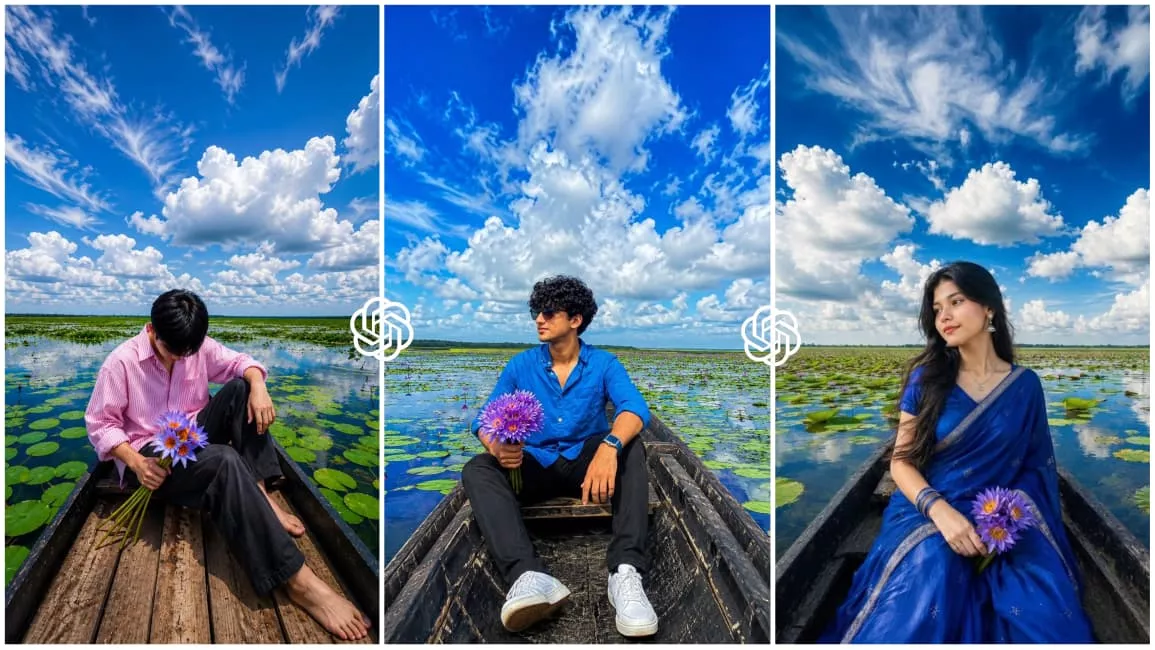
So, friends, let me give you the full details about this photo editing style. As I mentioned, this involves editing a photo where you appear to be sitting on the edge of a small, charming boat. You are posed in an aesthetic manner while the photo is taken. The background is the highlight here; the overall look it creates is truly captivating. The scene features the boat docked at the water’s edge, surrounded by beautiful aquatic flowers—like lotuses—in the background. The sky looks stunning, featuring clouds that give it a lovely monsoon-like atmosphere, making the entire setting appear completely realistic and natural. You, too, can create this realistic image using just one of your selfies. You will find the necessary prompt and the step-by-step process in the following paragraphs, so please keep reading the article.
Process Of This Photo Editing
Now, let’s discuss how to perform this editing. There are two ways to do it, and both rely on AI; the key lies in how you handle the prompts. For instance, if you copy the prompt associated with a reference image from this article, you must also save that reference image. When using the AI tool, you need to input both the reference image and your own photo alongside the prompt before hitting “generate” to create the final image. Alternatively, you could simply copy the prompt and use it directly with your own reference image; however, this might result in some changes to the specific look of the image. Using the prompt specifically designed for the reference image ensures the output matches that style exactly.
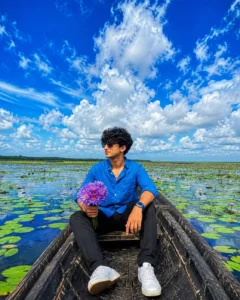
Ultra-realistic cinematic wide-angle portrait of a stylish young Indian man sitting relaxed inside a rustic black wooden boat in the middle of a vast water lily lake. He is wearing a vibrant royal blue button-up shirt with rolled sleeves, black jeans, white sneakers, black sunglasses, confident smile. He is holding a bunch of fresh purple water lilies in one hand while looking towards the horizon.The boat is surrounded by thousands of bright green lily pads floating on crystal-clear reflective blue water. Massive dramatic white cumulus clouds fill the entire sky with deep vivid blue tones. Hyper-detailed cloud formations, stunning reflections on water, vibrant nature landscape stretching endlessly to the horizon.Extreme HDR photography, ultra-vibrant colors, rich contrast, deep blue sky, bright emerald green lily pads, cinematic color grading, highly saturated yet realistic colors, breathtaking landscape, professional travel photography, DSLR quality, 24mm wide-angle lens, low perspective from inside the boat, sharp focus, natural sunlight, summer afternoon, ultra detailed textures, realistic shadows, dynamic range enhancement, masterpiece composition, 8K, UHD, photorealistic, hyper-realistic, crisp details, vivid color boost, National Geographic style photography.Color Palette: deep azure blue sky, bright white clouds, vibrant royal blue shirt, emerald green lily pads, reflective sapphire water, ultra HDR, high saturation, high contrast, vivid cinematic tones.Aspect Ratio 4:5
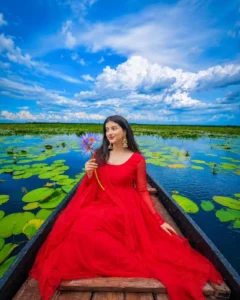
Create using refrence image Ultra-realistic cinematic wide-angle portrait of a beautiful young Indian woman sitting gracefully inside a rustic black wooden boat in the middle of a vast water lily lake. She is wearing an elegant royal blue silk saree with subtle silver embroidery, matching blouse, delicate bangles, small earrings, and natural makeup. Her long black hair flows softly in the breeze. She is holding a bunch of fresh purple water lilies in her hand and looking away with a gentle smile toward the horizon.The boat is surrounded by thousands of bright green lily pads floating on crystal-clear reflective blue water. Massive dramatic white cumulus clouds fill the entire sky with deep vivid blue tones. Hyper-detailed cloud formations, stunning reflections on water, vibrant nature landscape stretching endlessly to the horizon.Extreme HDR photography, ultra-vibrant colors, rich contrast, deep blue sky, bright emerald green lily pads, cinematic color grading, highly saturated yet realistic colors, breathtaking landscape, professional travel photography, DSLR quality, 24mm ultra wide-angle lens, low perspective from inside the boat, sharp focus, natural sunlight, summer afternoon, ultra detailed textures, realistic shadows, masterpiece composition, photorealistic, 8K UHD, National Geographic style, dreamy atmosphere.Color Palette: deep azure blue sky, bright white clouds, royal blue saree, emerald green lily pads, reflective sapphire water, ultra HDR, high saturation, high contrast, vivid cinematic tones.Ratio 4:5
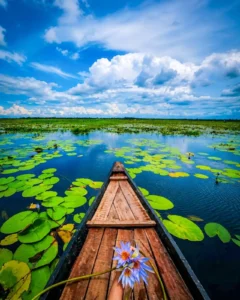
Same face Same outfit: ultrawide. Upper-angle low-angle shot of a young man sitting in the same boat This man who is sitting in a boat should look photo realistic with two stylish looks. Hand the boy flowers like the ones in the boat-hold them in one hand. And Increase the quality. Instagrammable 4:5 ratio, only One frame picture
How To Generate Photos Using Chatgpt?
Friends, I have already provided you with various image prompts in this article and explained them. Now, let me show you how to use these prompts to generate your own images and which AI tool to use for the process. We will be using ChatGPT for this image generation. First, copy the image prompt provided in this article, then install and open the ChatGPT app (available on the Play Store). Once opened, paste the prompt and click the plus (+) icon to add a reference image. Note that if you are using a prompt based on a reference image, you must also include the corresponding background image. After pasting the prompt and hitting generate, your image will be ready in just a few moments. The resulting image will look incredibly realistic and natural, so you should definitely give this a try.
Conclusion
So, friends, this is how you can easily create this viral photo editing style using prompts. Your ordinary selfie will be transformed into a trendy, attractive, and natural-looking photo—one that doesn’t look like it was generated by AI, but rather appears completely realistic. I have provided a detailed guide on the entire process, so you can understand it clearly by reading the article. If you encounter any issues, feel free to ask in the comments or contact us directly; we will do our best to assist you. Additionally, if you are looking for more trending photo editing prompts, you can visit our website. There, you will find a variety of unique prompts that you can copy to easily generate realistic images. I hope you enjoyed this article; feel free to share it if you liked it.