Aesthetic Beach Sunset Ai Photo Editing Prompt -Friends, a new photo editing trend is currently going viral on social media where people are transforming ordinary photos into aesthetic sunset beach-themed images—a style that is proving to be incredibly popular. Although these images look completely realistic, they are actually created using AI. If you want to transform your own ordinary photos into these aesthetic sunset beach images, then you should read this article. Today, I will teach you how to create this aesthetic beach-style edit. Creating these images is very easy with the help of AI; you simply need to use a specific prompt. In this article, I am providing various image prompts for this beach edit and will guide you on how to use them to generate your own images. So, read the article carefully, learn the editing process, and then go ahead and generate your own image.
About This Aesthetic Beach Sunset Ai Photo Editing Prompt
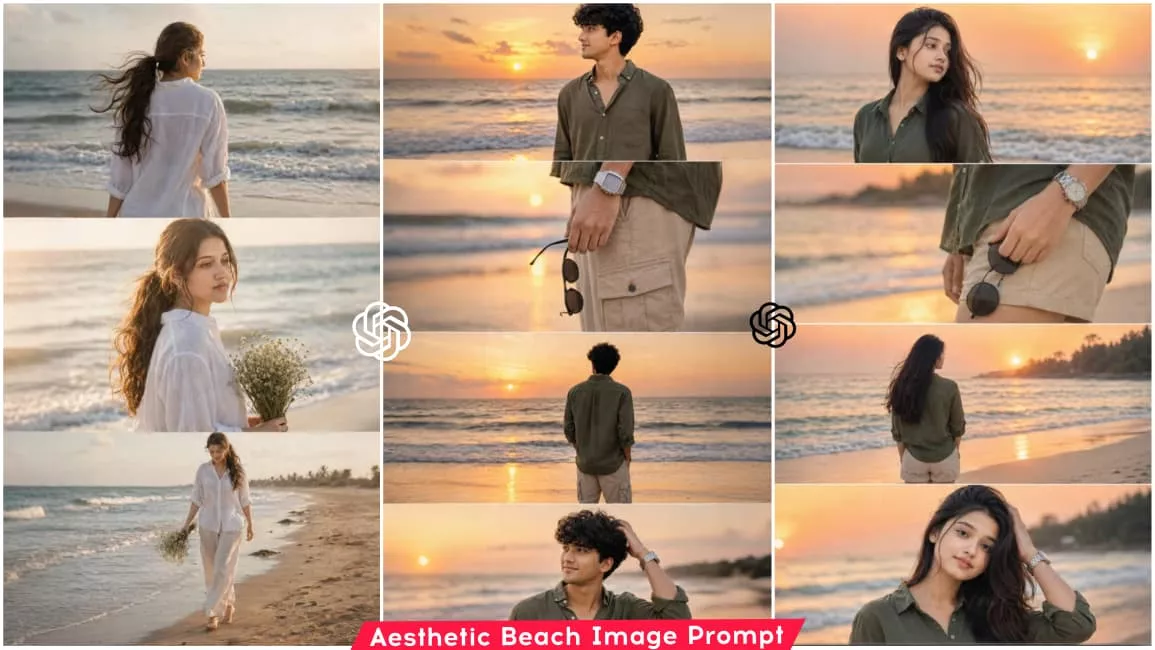
Let’s talk about this photo editing style—specifically, a beach-themed edit. If you use this prompt, it transforms an ordinary photo into an aesthetic composition featuring four or five layers. The background takes on the look of an aesthetic sunset beach—evoking the atmosphere of a seaside visit at sunset—while your image is split into multiple layers, displaying you in different poses within the same picture. You can create this image with the help of a prompt; simply send the prompt and a reference image to the AI, and it will generate the final result for you. So, stay tuned to this article as I walk you through the process of generating this image using the prompt.
How to Create Image Like This
To create this kind of edited photo, we need an AI tool, and you can easily generate these images using apps like Google Gemini or ChatGPT. With either of these, you can effortlessly create trendy and realistic images. Let me show you how to use ChatGPT: first, copy the image prompt provided in the article; then, open the ChatGPT app and add your reference image using the plus (+) icon; finally, paste the prompt and hit generate. Within moments, ChatGPT will have your image ready—one that looks completely realistic, featuring a sunset beach vibe, aesthetic cinematic filters, and a highly attractive appearance. Below, I am sharing various images along with their corresponding prompts; feel free to copy the prompt for any image you like and generate your own version.
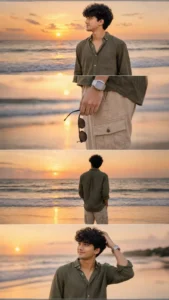
Ultra-realistic DSLR cinematic beach photoshoot collage featuring the SAME person from the uploaded reference image. Preserve the face identity with 100% accuracy — exact facial structure, hairstyle, beard density, jawline, skin tone, eye shape, body proportions, and natural expression. Keep the authentic realistic Indian male appearance. Do NOT beautify, reshape, smooth skin excessively, or alter facial features.

Generate an Instagram portrait size vertical 4-photo collage (1080x1350) in a luxury cinematic reel-cover aesthetic. Maintain the exact trendy stacked collage composition with clean horizontal divisions between each frame.

Environment: tropical beach during golden sunset hour, pastel orange-pink sky, glowing horizon, soft ocean waves, wet reflective shoreline sand, dreamy cinematic atmosphere, warm sunlight reflections, subtle sea breeze movement, realistic travel photography mood.

Outfit styling: olive green linen shirt with rolled sleeves, beige cargo shorts, silver metal wrist watch, black round sunglasses in hand, slightly messy textured hair.

Photo 1:
Medium cinematic portrait standing near shoreline, side profile looking toward the sunset horizon, calm expression, ocean waves behind, soft warm sunlight on face.

Photo 2:
Close-up aesthetic shot of hand holding black sunglasses beside shorts pocket, visible silver watch, shallow depth of field, smooth bokeh beach background.

Photo 3:
Back-view pose standing near ocean water facing the sunset, relaxed posture, cinematic framing, golden light reflecting on wet sand.

Photo 4:
Natural candid pose touching hair while smiling softly, warm sunset glow on skin, wind-blown hair effect, dreamy cinematic mood.

Photography Style:
Ultra-realistic DSLR photography, 85mm lens, f/1.8 aperture, shallow depth of field, HDR lighting, cinematic color grading, realistic skin pores, soft highlights, natural shadows, travel influencer aesthetic, luxury Instagram vibe, 4K ultra detailed.

Composition:
Exact same vertical stacked collage layout, evenly spaced photo strips, clean minimal borders, smooth warm tones, balanced cinematic framing, realistic lighting and shadows, premium Instagram reel-cover appearance.

Negative Prompt:
cartoon, painting, CGI, overedited face, smooth plastic skin, blurry details, distorted anatomy, extra fingers, duplicate body parts, unrealistic expressions, low quality, deformed hands, fake AI look, oversaturated colors, watermark, text, logo, cropped face, bad proportions.
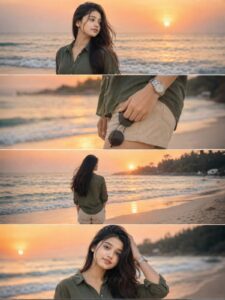
Ultra-realistic DSLR cinematic beach photoshoot collage featuring the SAME girl from the uploaded reference image. Preserve face identity 100% exactly — same facial structure, hairstyle, jawline, skin texture, expression style, body proportions, and natural appearance. Do NOT modify, beautify, age-change, slim, or stylize the face. Maintain the original realistic Indian female look with authentic features and exact face resemblance.

Create an Instagram portrait size 4-photo vertical collage (1080x1350) exactly like a trendy cinematic reel cover. Keep the SAME collage layout and framing style as the reference image.

Scene: golden sunset beach with pastel orange-pink sky, soft ocean waves, wet reflective sand, dreamy tropical atmosphere, warm cinematic sunlight, shallow depth of field, realistic DSLR photography, highly detailed skin texture, soft natural color grading.

Outfit: elegant olive green linen shirt with rolled sleeves, beige shorts, silver wristwatch, holding black round sunglasses. Natural beach fashion styling, realistic fabric texture, subtle wind movement.

Photo 1: medium side-profile portrait looking towards the horizon, calm and confident expression, ocean waves behind, cinematic sunset glow.

Photo 2: close-up shot of hand holding black round sunglasses near shorts pocket, shallow depth of field, cinematic focus blur background, detailed accessories.

Photo 3: back pose standing near shoreline facing the ocean during sunset, relaxed posture, soft breeze moving hair naturally, reflective wet sand.

Photo 4: candid portrait touching hair while smiling slightly, warm golden sunlight illuminating face, dreamy beach atmosphere, authentic expression.

Composition: exact same vertical stacked collage layout with thin borders between photos, aesthetic Instagram reel-cover style, balanced spacing, smooth warm tones, realistic shadows and lighting, professional travel-photography composition.

Camera settings: DSLR quality, 85mm lens, f/1.8 aperture, ultra-realistic HDR photography, natural skin texture, cinematic travel photography style, 4K details, shallow depth of field, realistic bokeh, magazine-quality portrait.

Color grading: warm golden-hour tones, soft orange-pink highlights, cinematic contrast, natural skin colors, luxury travel aesthetic, realistic sunset reflections.

Negative prompt: blurry face, extra fingers, distorted body, cartoon look, over-editing, unrealistic skin, AI face changes, beauty filters, low quality, duplicate person, bad anatomy, overexposed lighting, watermark, text, unrealistic proportions, plastic skin, excessive makeup, altered facial features.
Why This Editing Is So Viral?
Friends, this style of photo editing is currently trending heavily. The reason is that the editing creates an effect that really draws people in—mimicking the kind of photos one would take while vacationing at a beach. Many people are too busy with work to actually travel, but that is no longer an issue. Now, with the help of AI, you can easily create such photos yourself. They look incredibly realistic, so anyone seeing them would assume you had actually gone on a trip. Capitalizing on this, people everywhere are creating these images, and the trend is going viral.
Conclusion
Friends, this style of photo editing is currently trending heavily. The reason is that the editing creates an effect that really draws people in—mimicking the kind of photos one would take while vacationing at a beach. Many people are too busy with work to actually travel, but that is no longer an issue. Now, with the help of AI, you can easily create such photos yourself. They look incredibly realistic, so anyone seeing them would assume you had actually gone on a trip. Capitalizing on this, people everywhere are creating these images, and the trend is going viral.If you are interested in creating more photos based on trending styles, you can visit our website to check out the prompts. We provide the prompts for any new viral photo trend, making it easy for people to create their own images.