Rani Pari Ai Photo Editing Prompt – Friends, ever since the AI photo editing trend took off on social media, new viral trends have been emerging daily where people create hyper-realistic images of themselves. These photos look completely authentic, yet they are crafted using AI to achieve that lifelike quality. Now, another new photo editing trend is going viral where people are creating images of themselves alongside ‘Rani Pari’ (the Fairy Queen). In this trend, if you use your own photo, an image of Rani Pari is added to it, making it appear as though she is standing right next to you. This trend pays homage to the character Rani Pari from the TV series Baalveer. Since Baalveer was a childhood favorite for so many of us, you can now create your own realistic Baalveer-style edit featuring Rani Pari—complete with a cinematic look and a highly realistic finish. Let me walk you through the entire process of creating this AI photo edit yourself.
Details Of Rani Pari Ai Photo Editing Prompt
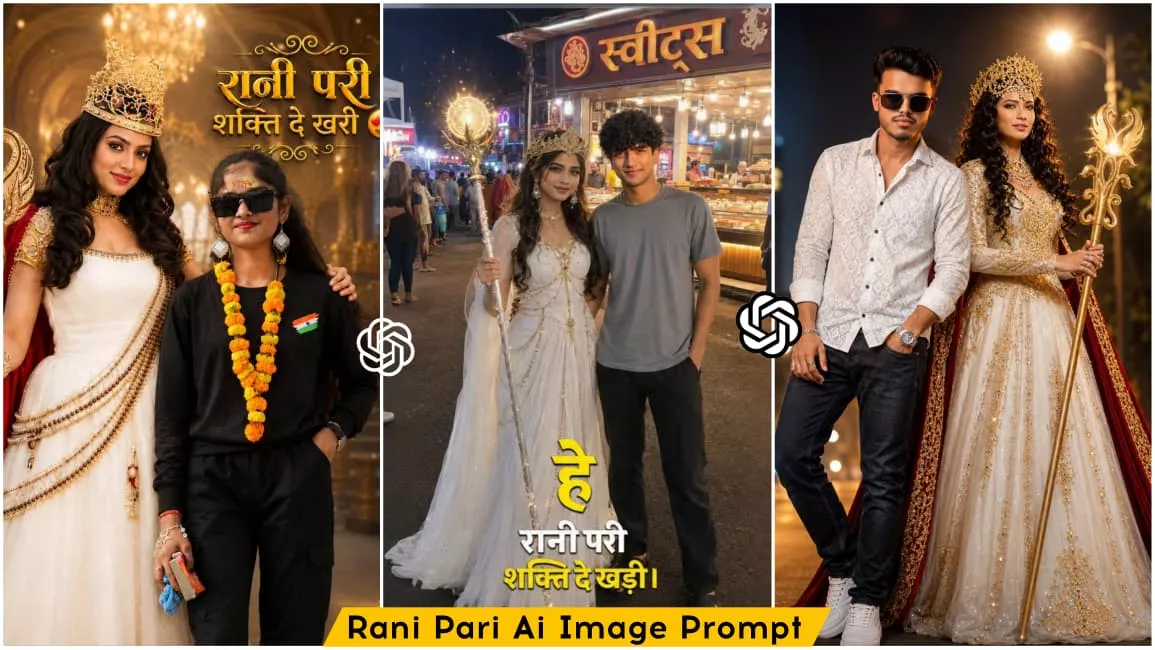
In this photo editing style, you will see images created with a cinematic look that appear incredibly realistic. Two characters are featured: the first is you—where, by adding your own reference image, an AI-generated version of yourself is created—and the second is ‘Rani Pari.’ You are likely familiar with Rani Pari, the famous character from the Baalveer series, who has been incorporated into this edit. In some images, she is shown standing beside you, while in others, she strikes a stylish pose with you for the photo. Some images also feature the dialogue, “Hey Rani Pari, grant me power,” rendered in stylish text. In this article, I am providing various prompts that will allow you to create different versions of these Rani Pari edits; simply use these prompts to generate your images. Let me walk you through the process.
Why This Editing Is Going Viral?
This style of photo editing is currently going viral on social media, with people everywhere creating these images because they look both realistic and creative. It allows people to relive childhood memories; back when they watched the Baalveer series, they loved characters like Rani Pari and Baalveer. Now, people are using the Rani Pari character to create their own photos. The results are also amusing, as these scenarios aren’t possible in real life—instead, we are using AI to generate images based on our imagination. Creating these photos is incredibly easy; you can generate them with the help of AI, and the final result looks completely realistic. This ease of editing is a major reason why this trend has gone so viral.
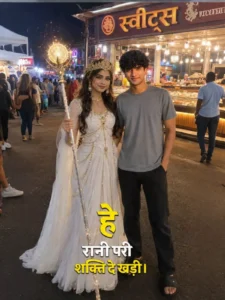
Night street-market photv, Rani Pari-style fairy queen in white gown with golden chains, crown and glowing staff standing beside a young man in grey t-shirt, dark pants and black slides. Use exact faces from reference images. Hindi sweets shop (“स्वीट्स”) in background, realistic smartphone candid shot, natural night lighting. Text: “हेरानी परी शक्ति दे खड़ी।
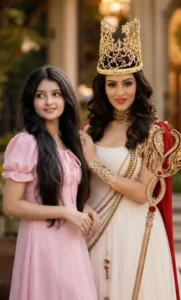
Ultra-realistic cinematic fantasy royal portrait, Instagram 4:5 ratio. A majestic Queen Fairy (Rani Pari) standing inside a luxurious golden palace with grand royal stairs, sparkling chandeliers, glowing warm lights, and magical golden bokeh effects. She wears an elegant white royal gown with intricate golden embroidery, a luxurious golden crown, red royal cape, premium jewelry, and holds a magnificent golden magical staff. Standing beside her is a handsome young Indian boy with the exact face, hairstyle, facial features, skin tone, beard, and expression from the uploaded reference image, wearing a fitted white sleeveless tank top and black formal trousers, hands in pockets, confident royal pose. The Queen Fairy places one hand gently on his shoulder. Highly detailed royal fantasy atmosphere, cinematic lighting, ultra-sharp focus, realistic skin texture, luxury palace interior, magical golden glow, depth of field, professional poster design. Top-right large 3D golden Hindi typography: "रानी परी शक्ति दे खरी 😍" Elegant ornamental flourishes around the text, premium gold lettering, fantasy movie poster style, vibrant colors, masterpiece quality, 8K ultra-realistic, photorealistic, dramatic royal fantasy composition.
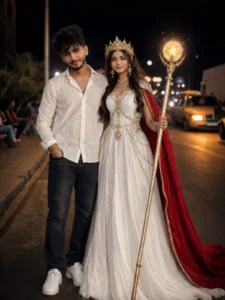
"Create an ultra-realistic cinematicnight portrait of a stylish young man standing confidently beside a fantasy queen-like woman on a roadside at night. The young man is wearing a white patterned shirt, dark jeans, and sneakers with a calm expression. The woman is dressed in an elegant white royal gown with golden details, wearing a luxurious crown and holding a glowing ornate staff, with a flowing red cape behind her.
How To Generate Image like this?
You can use AI tools like Google Gemini or ChatGPT to create this edited image; both are currently very popular and completely free to use. The process is simple: just copy any image prompt provided in the article, open either application, paste the prompt, and add a reference image. To add the reference image, click the plus icon and select a real photo of yourself from your gallery. Then, hit the send button and wait a few moments; your image will begin generating, and shortly after, your ‘fairy princess’ image will be ready. That is how you can create this image for free.
Final Words –
So friends, I hope you really like this ‘Queen Fairy’ photo editing style. I have explained all the steps to create this edit and provided various prompts, each containing unique details; this means every prompt will generate a distinct image—all featuring the ‘Queen Fairy’ theme but with different backgrounds, cinematic looks, and other variations. You can now easily create this edit yourself. If you want to try more trending photo editing styles, keep visiting our website; you will find new articles daily that teach various photo editing techniques.