God Meeting Girl & Boy Ai Photo ChatGpt Prompt – Hello friends, and welcome to today’s article! In this post, we will learn how to perform trending AI-based photo editing. Today, I am going to teach you how to create a highly viral and trending AI photo edit—a style that is currently sweeping across social media. You have likely already seen people creating images of themselves alongside deities; they take a standard selfie and, using AI, generate a composite image where a divine figure appears right beside them. In some variations, a massive statue of a deity—such as Lord Shiva—appears on a wall, with the subject standing leaning against it. These various types of AI-generated photos featuring deities are currently trending, and they are proving to be quite popular among people right now. So, in today’s article, I will walk you through the process of creating this AI photo edit step-by-step. This guide will be extremely helpful, enabling you to easily create your very own trending photo edits.
About God Meeting Girl & Boy Ai Photo ChatGpt Prompt
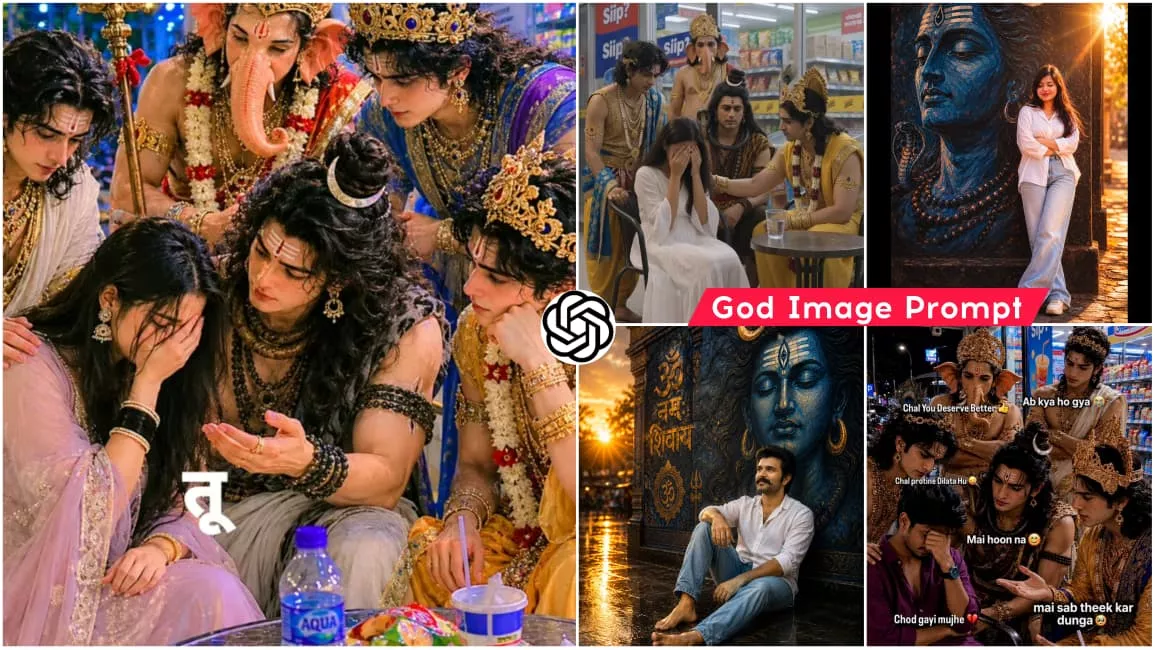
As I mentioned earlier, this tutorial focuses on AI photo editing, wherein we will utilize AI to generate images. Specifically, we will create scenes featuring divine presence—moments where you are seated on a chair during a sorrowful time, and right beside you stand various deities—such as Lord Shiva, Hanuman, Lord Ganesha, Krishna, and Rama—standing together to comfort you and inquire about your troubles. This promises to be a truly unique and distinctive style of editing. In another variation, the image features a massive wall behind you, adorned with a large, hyper-realistic, painting-style depiction of Lord Shiva, while you sit with your eyes closed; the resulting photograph looks incredibly cinematic and lifelike. You can easily generate these images with the help of AI. In this article, I am providing you with the specific prompts required to create these photos; by using them, you will be able to generate these images yourself. However, I recommend reading through the article first to familiarize yourself with the necessary steps.
What Do You Need For This Image Editing?
Friends, to perform this photo editing, you will need a real photograph, a prompt, and an AI tool. First, you should have a real image of yourself ready to serve as a reference; this will enable you to generate an AI image that closely resembles your face. Next, you will require the most crucial element: a prompt. This prompt contains all the necessary details regarding the specific type of image you wish to create; when you provide this command to the AI, it generates the image accordingly. The required prompt has been provided within this article. Now, using this prompt and your reference image, you can proceed to create your image using an AI tool. Currently, Gemini and ChatGPT are the most widely used tools for generating images. Therefore, you can utilize either of these platforms to create your own realistic image.
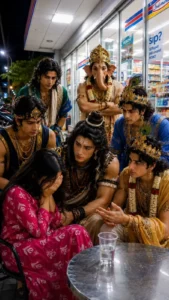
POV realistic iPhone photo, vertical 9:16, no filter/HDR, raw natural quality with slight grain and lighting imperfections.Setting & Background:Nighttime in front of a local Indomaret.Outdoor seating beside a glass wall, bright fluorescent canopy lights from above creating slightly harsh shadows.Behind them, large windows with "sip?" branding and visible snack/drink shelves. Left side shows a dark street with parked motorbikes and faint streetlights.Clean tiled minimarket floor.Props & Environment:Small round metal table with randomglass of water.Simple metal chairs around it.Subjects:Subject 1 (girl i send you): Left side, relaxed but leaning back, hiding herface while crying.Subject 2 (lord shiva): Center/front dominant, slightly leaning forward. Sharp, intense expression, looking directly at Subject 1 with deep concern.Subject 3 (lord vishnu): Right side, calm and focused. Talking to Subject 1 with slight hand gestures, looking like he's explaining something logically.Subject 4 (lord krishna): Calm, natural and composed. Focused expression, trying to calm Subject 1 down with a kind gaze.Subject 5 (lord ganesh): Standing behind the group, arms crossed, listening intently to the conversation with a neutral, serious face.Subject 6 (lord balram): Behind Jude Bellingham. Calm, natural composed.Listening intently to the conversation with serious face,giving advice. Pose & Interaction:Casual "nongkrong" but with a deeper, slightly tense mood. All subjects are engaged in the conversation, not looking at the camera (candid shot). Everyone is focused on Subject 1.Styling & Outfit:Subject 1 wearing same cloth as picture and other subject wearing cloths according to their character.expensive-looking accessories (rings).Lighting & Camera Feel:Top-down fluorescent lighting, slightly overexposed highlights, uneven shadows, natural minimarket lighting, no flash.
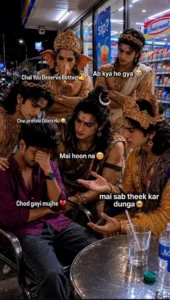
RAW iPhone 15 Pro candid photo, indistinguishable from a real photograph, not AI-generated in any way. POV realistic iPhone photo, vertical 9:16 aspect ratio, raw unedited camera quality, no filters, no HDR, natural smartphone photography with slight grain, realistic lighting imperfections, authentic social media snapshot aesthetic. IMPORTANT FACE REQUIREMENT (HIGHEST PRIORITY): Use the uploaded reference image for exact facial identity preservation. The young Indian man must retain 100% of the same face, facial structure, skin tone, hairstyle, beard, glasses (if present), jawline, eyes, nose, lips, facial proportions, and all recognizable features from the reference image. Do not modify, beautify, stylize, age, de-age, enhance, or alter the face in any way. Maintain perfect likeness and identity accuracy. The face must look exactly like the uploaded person photographed in this new situation. ### Setting & Background Nighttime outside a local Indomaret convenience store. Outdoor seating area beside a large glass wall. Bright fluorescent canopy lights overhead creating slightly harsh shadows and realistic convenience-store lighting. Behind the group are large windows showing visible snack shelves, drinks, refrigerators, and convenience-store branding. Left side reveals a dark street with parked motorbikes and distant streetlights. Clean tiled minimarket floor with realistic reflections. Authentic Southeast Asian convenience-store atmosphere. ### Props & Environment Small round metal table. Several simple glasses of water on the table. Basic metal chairs surrounding the table. Natural convenience-store environment. No staged appearance. ### Subjects #### Subject 1 (Boy from Uploaded Reference Image) Seated on the left side. Wearing the exact same clothes shown in the uploaded reference image. Barefoot. Leaning back slightly. Covering part of his face while crying emotionally. Visible tears. Looks heartbroken and overwhelmed. Face preserved exactly from reference image. #### Subject 2 (Lord Shiva) Center position, dominant presence. Realistic human interpretation. Long matted hair. Rudraksha beads. Tiger-print cloth and traditional accessories. Barefoot. Leaning forward slightly. Sharp, intense expression. Looking directly at Subject 1 with deep concern and disappointment. #### Subject 3 (Lord Vishnu) Seated on the right side. Realistic human interpretation. Traditional royal attire. Elegant ornaments. Barefoot. Calm and focused expression. Speaking to Subject 1 with gentle hand gestures. Looks like he is explaining something logically and wisely. #### Subject 4 (Lord Krishna) Realistic human interpretation. Peacock feather crown. Traditional royal clothing. Elegant jewelry. Barefoot. Kind and composed expression. Looking directly at Subject 1. Trying to comfort him with compassion. #### Subject 5 (Lord Ganesha) Standing behind the group. Realistic divine appearance. Traditional attire. Barefoot. Arms crossed. Listening carefully. Neutral but serious expression. Focused on Subject 1. #### Subject 6 (Lord Balarama) Standing behind the group. Traditional attire fitting his character. Barefoot. Calm and wise expression. Listening attentively. Appears to be giving thoughtful advice. ### Pose & Interaction Casual late-night "nongkrong" gathering outside a convenience store. Emotionally heavy atmosphere. Feels like close friends helping someone through a difficult moment. Nobody is posing. Nobody is looking at the camera. Everyone is focused on Subject 1. Natural candid moment captured unexpectedly. Authentic human interaction. ### Barefoot Requirement (VERY IMPORTANT) All subjects must be completely barefoot. No shoes. No sneakers. No sandals. No slippers. No socks. No boots. No flip-flops. No footwear of any kind. No footwear visible anywhere in the image. No footwear under chairs. No footwear beside the table. No footwear in the background. Feet naturally touching the tiled floor. ### Styling Grounded realistic modern-world appearance. No fantasy armor. No exaggerated mythology costumes. Realistic human versions of divine characters. Premium-looking rings, bracelets, necklaces, and accessories. Natural fabrics and textures. ### Lighting & Camera Feel Overhead fluorescent convenience-store lighting. Slightly overexposed highlights. Uneven shadows. Natural night-time lighting. No flash. No professional lighting setup. Natural smartphone dynamic range. Minor motion blur. Slight sensor noise. Realistic white balance imperfections. Handheld phone-camera feel. ### Realism Requirement (HIGHEST PRIORITY) Must look exactly like a genuine candid iPhone photo taken by a friend sitting nearby. Absolutely no AI-generated appearance. No cartoon look. No anime style. No digital art. No illustration. No painting effect. No CGI. No 3D render. No fantasy artwork. No game character appearance. No movie-poster composition. No cinematic hero shot. No stylized faces. No beauty-filter skin. Natural skin pores. Natural wrinkles. Natural imperfections. Authentic facial textures. Messy realistic lighting. Photojournalism realism. Documentary photography style. Instagram-worthy but completely authentic. Indistinguishable from a real smartphone photograph. ### Camera Details iPhone 15 Pro camera. 26mm equivalent lens. Vertical 9:16 framing. Eye-level angle. Slight handheld shake. Natural depth of field. Realistic smartphone processing. Unedited appearance. ### Negative Prompt cartoon, anime, manga, illustration, painting, artwork, digital art, CGI, 3D render, unreal engine, octane render, fantasy art, game character, doll face, plastic skin, beauty filter, AI-generated look, synthetic lighting, glowing aura, mystical effects, fantasy particles, excessive sharpness, overprocessed image, fake skin texture, low quality, blurry face, duplicate face, distorted face, altered identity, extra fingers, extra limbs, cropped feet, footwear, shoes, sneakers, sandals, slippers, socks, boots, flip-flops, camera pose, looking at camera, studio lighting, cinematic poster, unrealistic colors, watermark, logo, text.
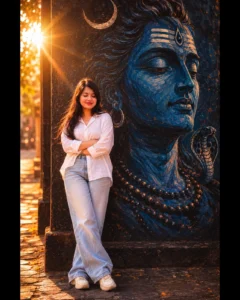
A cinematic, full-length portrait of a young South Asian woman with closed eyes and crossed, wearing an oversized white button-down shirt and light-wash wide-leg jeans, leaning against a dark textured wall next to a massive, serene blue mural of Lord Shiva's face, illuminated by a dramatic, glowing backlight that creates an ethereal halo effect with a warm, grainy 90s film aesthetic.
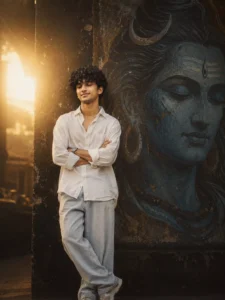
A cinematic, full-length portrait of a young South Asian man with closed eyes and arms crossed, wearing an oversized white button-down shirt and light-wash wide-leg jeans, leaning against a dark textured wall next to a massive, serene blue mural of Lord Shiva's face, illuminated by a dramatic, glowing backlight that creates an ethereal halo effect with a warm, grainy 90s film aesthetic.
How Can You Create This Imgae In Chatgpt?
Friends, the image prompts required to create this trending AI image have been provided. Now, if you wish to use them to generate a realistic image, you can utilize ChatGPT. It will generate the image for you completely free of charge, and using it is incredibly simple. First, copy the image prompt provided in this article, and then open ChatGPT. Alternatively, you can click the “Create Image” button within the article; this will open ChatGPT, where you can paste the prompt. Next, use the plus (+) icon to add your reference image—ensure that your face is clearly visible in the image. Finally, click the “Send” button to submit this command to ChatGPT. After waiting just a few moments, ChatGPT will generate your image. In this image, you will appear alongside the deity, and the result will be highly realistic.
Conclusion
So friends, this is how you can create these viral, realistic AI images featuring deities. In this article, I have provided you with various image prompts in different styles, which you can use to generate a diverse range of AI images. Additionally, I have explained exactly how to create these images; you can now simply follow the steps provided to generate your own visuals. This style of photo editing resonates deeply with our real lives, which is why people are enjoying creating such images. I hope you enjoyed this tutorial on creating viral AI photos; please be sure to share it!