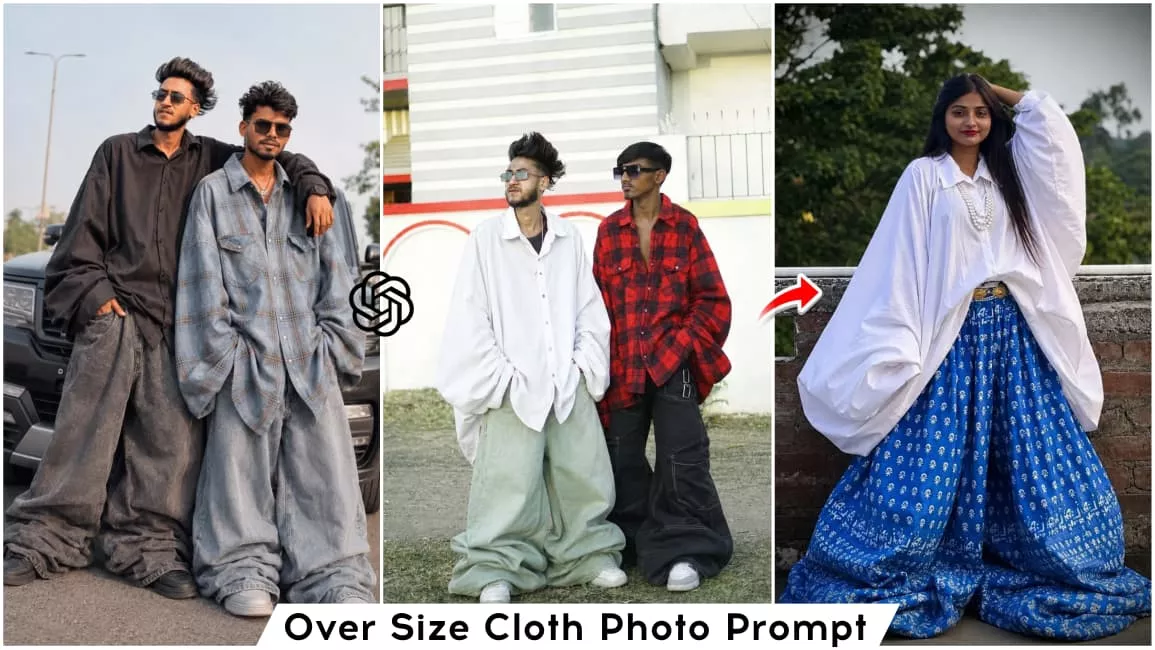
Over Size Cloth Ai Photo Editing Prompts – Friends, a new style of photo editing is going viral on social media. In this trend, people are transforming their ordinary photos into images featuring baggy clothing—essentially turning their regular outfits into oversized attire. If you, too, would like to try this photo editing style, read on! In this article, I will teach you exactly how to create these “baggy clothes” edits. I will provide you with specific image prompts and guide you through the process of generating these edits using AI. So, simply follow the steps outlined in this article to easily create your own trendy photo edit.
Details Of Over Size Cloth Ai Photo Editing Prompts
As I mentioned, this will generate a photo in a “baggy” style, in which you will appear wearing clothes that are significantly oversized—giving the impression that you are wearing garments belonging to a much larger person. Furthermore, this photo will be created using one of your actual images as a reference. An image prompt has been provided within this article; you can use it to generate a version of your photo featuring this baggy clothing style. I will explain the process for creating this image in the following paragraphs.
Why This Editing Is Trending In Social Media?
Friends, this photo editing style is currently trending massively on social media because images of this kind appear both funny and creative. While we cannot wear such outfits in real life, with the help of AI, we can certainly create them with ease. This is exactly what everyone is doing: generating AI-based photos featuring oversized clothing and sharing them across social media platforms. Consequently, this has evolved into a major trend, and these photos are going viral. People are creating and sharing these images using their own photos, those of their friends, or even their girlfriends. So, if you would also like to create such a photo, you can generate your own AI image using the prompts provided in this article; the step-by-step process can be found in the “How to Use” section.
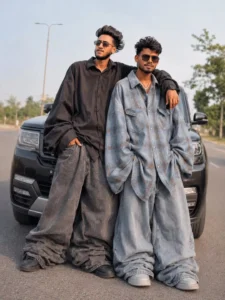
"Automatically transform the clothes on the person in the uploaded photo into an EXTREME oversized, massive, and baggy 'jhula dhala' fashion outfit. The Al must NOT require any reference image; only use the clothes already visible on thesubject.Transformation Rules:Top/Shirt: Make the top 4X-6X larger than the actual body. Sleeves must be extremely wide, puffy, and hanging well below the hands. Bottoms/Pants: Make the pants ultra-wide, heavily oversized, balloon-style, and bunched/stacked near the feet. Fabric: Add huge fabric volume, dramatic loose folds, and a droopy/ chunky silhouette so the outfit looks comically large but naturally draped.Preservation: Strictly preserve the person's real face, hairstyle, skin tone, pose, body angle, and background exactly as they are.Keep the original clothing style and color theme identical to the original image."
How To Generet Image Like This?
Friends, to generate an image, you need to use an editing application—such as ChatGPT or Google. You can create your AI-generated photo using either of these apps. I will now guide you through the process of creating an image using ChatGPT. First, to generate the image, copy one of the image prompts provided in this article. Next, open the ChatGPT application. Then, paste the prompt you copied into the text field. After that, use the plus (+) icon to add a reference image—specifically, the photo you wish to edit in the “baggy clothes” style. Once added, click the “Send” button and wait a few moments; the application will generate and prepare your image. The resulting photo will feature you wearing oversized clothing, appearing exactly as if you are wearing baggy attire, and the image itself will look completely realistic.
Final Words –
So friends, in this way, you can apply a truly “overseas-style” clothing aesthetic to your photos. ChatGPT makes the process of creating these edits incredibly simple; using just a single prompt, you can easily generate any kind of image you desire. It is completely free to use, and you do not need any prior editing skills to utilize it—you can effortlessly create your own trendy images with absolute ease. I hope you enjoyed the editing techniques demonstrated in this article. If you wish to create more unique and trending photo edits like this, feel free to visit our website to explore further.