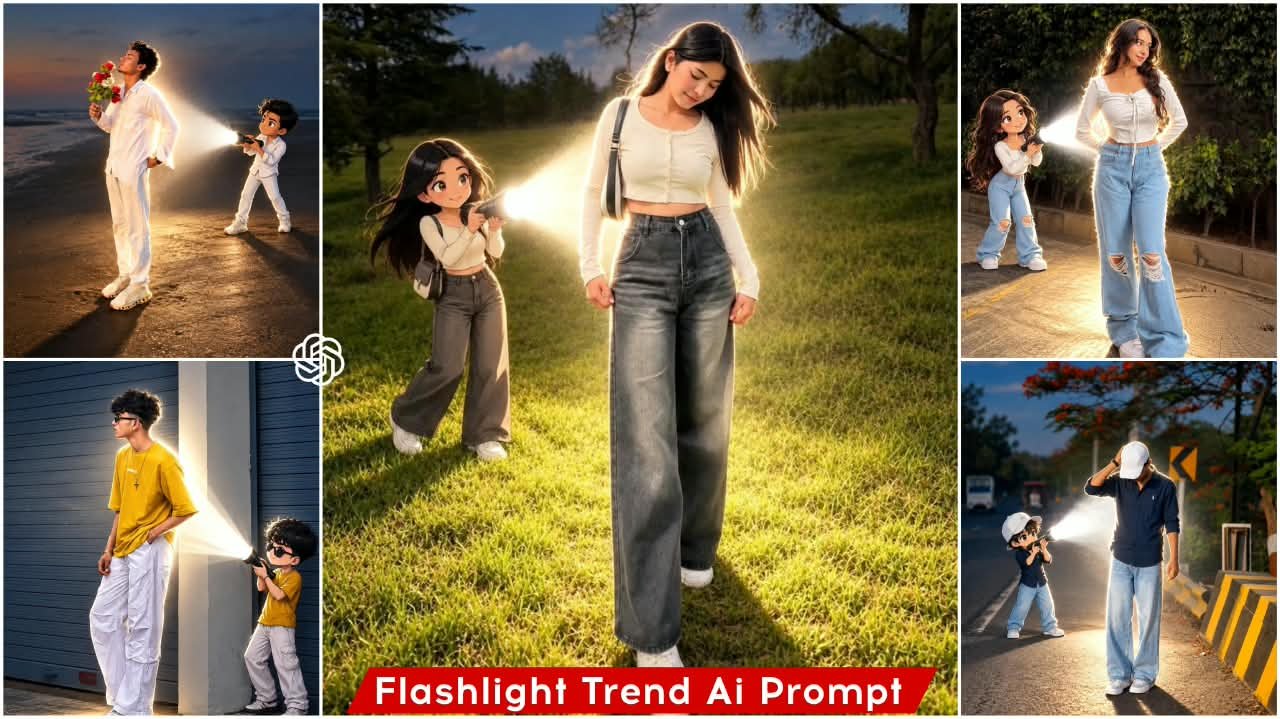
Anime Flash Light Ai Photo Editing Prompt – Friends, at this time, a new photo is becoming very viral on social media, which has become quite a trend. People are sharing this type of photo on social media by creating it with the help of AI, due to which people are liking the photos very much. So friends, if you also want to create such a viral image, you also want that you too should create such a realistic anime style image which is very much in trend right now, then friends, you should follow this article because in today’s article, I am going to teach you how to create this viral trending AI image with an anime flashlight. In this article, I will tell you how to create this image with very easy steps and will also provide you with an image prompt for it, with the help of which you will be able to easily create your own realistic image in anime style by using AI and using that prompt. So friends, by following this article, we will know the entire process.
Details Of Anime flash Light Ai Photo Editing Prompt
Look, as I told you, we’re going to create a realistic photo. First, let me explain the details of this photo editing process, including the kind of editing you’ll see. Friends, this photo is being created in an anime-style flashlight mode. You’ll see a full-body, realistic image of you, and behind it, an anime version of you, with a torch focused on your body, and that small, anime version is your own. The torch is reflecting on your body, creating a regular outline. This scene looks quite realistic, giving you the opportunity to create a very aesthetic and cinematic vibe. Friends, we can create this photo simply with a selfie or a clear image of our face. We’re going to create this realistic image by selecting a prompt and using our face. So, friends, I’m going to explain the entire process to you. Stay tuned to the article.
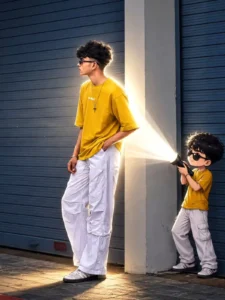
Transform the main subject into a small full-body anime/cartoon version of themselves, matching their hairstyle, outfit, accessories, colors, and recognizable details. Use the reference's clean modern anime aesthetic sharp linework slightly oversized head, compact proportions, cel shading, and expressive details. Position the anime character directly behind the real subject, holding a flashlight aimed forward at their back. Create an intense realistic white beam that fully illuminates the subject from behind, producing bright rim light, glow, and natural shadows. Dim the surrounding outdoor light for dramatic contrast. Preserve the original scene, camera angle, composition, and realism.
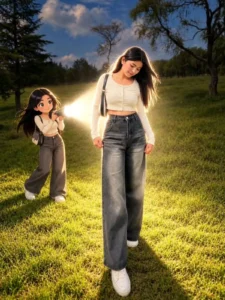
Transform the uploaded photo into a cinematic real-life and anime fusion scene. Keep the main subject completely recognizable, preserving their original face, hairstyle, body proportions, clothing, accessories, pose, and overall appearance. Add a small full-body anime version of the same person standing naturally behind them, wearing the exact same outfit and matching the hairstyle and colors. Give the anime character a polished modern anime design with crisp linework, expressive eyes, subtle cel shading, and slightly exaggerated proportions. The anime character should hold a powerful flashlight directed toward the real subject's back. Create an intense realistic white light beam with strong illumination, soft atmospheric glow, bright edge lighting, realistic shadows, and subtle light particles. Slightly darken the surrounding environment to emphasize the flashlight while maintaining the original sunset/outdoor atmosphere. Preserve the original background, camera perspective, framing, composition, and photographic realism. Make the anime character feel naturally integrated into the environment with accurate contact shadows and lighting interaction. Create a highly detailed, cinematic, realistic-looking final image with a seamless anime-meets-photography effect, Ratio 3:4
How To Create This ImageUsing Chatgpt?
To create this photo, you simply need to know this easy method. You will see your photo turn out with excellent results, and you’ll be amazed at the fantastic editing—all you have to do is use a prompt. Your photo will be ready with a professional finish. Here’s how: first, you need to use ChatGPT. Start by copying the prompt, then open ChatGPT.
Click on the plus (+) option to upload any reference photo. After that, paste the prompt and generate the image. This will create a stunning photo for you—one that perfectly matches the style of the prompt you copied.
Conclusion
Friends, you too can easily perform this viral flashlight trending photo editing. In this article, I’ve explained the entire process in a simple way, allowing you to easily create this viral photo. I hope you’ll enjoy it. For more trending photo editing tips like this, visit our website; you’ll easily find trending prompts there.