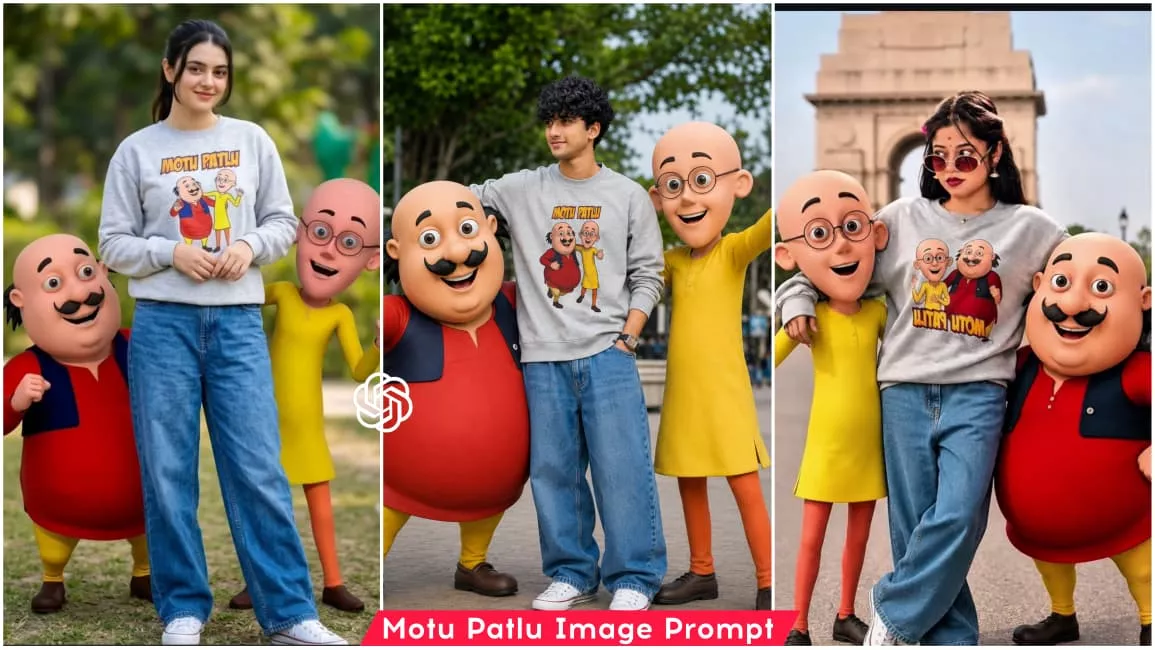
Motu Patlu Ai Photo Editing Prompt – If you are active on social media, you have likely noticed a new AI photo editing trend going viral on Instagram. People are sharing images where they blend their own photos with the characters ‘Motu’ and ‘Patlu’ to create a realistic look—making it appear as though the characters actually posed for a photo with them. Motu and Patlu are incredibly famous cartoon characters in India; they are favorites known to every child. While we cannot meet them in real life, we can bring them into our imagination. Now, thanks to AI, it is possible to incorporate them into our photos. In this tutorial, I will teach you how to add these characters to your real photos to create a realistic, AI-generated image. I will guide you through the process using specific prompts; by following this article, you will gain all the necessary information and the prompts needed to create this Motu-Patlu AI edit. So, read on to learn how it’s done.
About This Motu Patlu Ai Photo Editing Prompt
As I mentioned, we are going to create a photo edit featuring the famous Indian cartoon characters Motu and Patlu—beloved by both children and adults alike. In this editing concept, these characters will be integrated into your real photo; Motu will stand on one side of you and Patlu on the other, striking stylish poses as if they are being photographed alongside you, resulting in a highly realistic image. Creating this photo is incredibly easy; you simply need a reference image and a specific prompt. Once you input these into the AI tool and generate the image, you will get your realistic Motu-Patlu photo. Let me explain the rest of the process in the next paragraph—please continue reading the article.
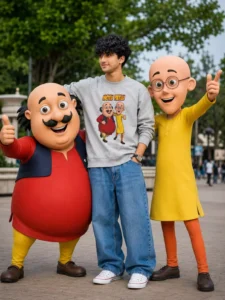
USE THE UPLOADED PHOTO AS THE ONLY FACE REFERENCE. PRESERVE THE PERSON’S IDENTITY WITH AN EXACT FACE MATCH, INCLUDING FACIAL STRUCTURE, JAWLINE, SKIN TONE, HAIRSTYLE, BEARD DETAILS, EYES, NOSE, LIPS, EXPRESSION, AND OVERALL LIKENESS. MAINTAIN PERFECT IDENTITY CONSISTENCY FROM THE REFERENCE IMAGE. DO NOT ALTER, RECREATE, STYLIZE, OR REPLACE THE FACE IN ANY WAY.
CREATE AN ULTRA-REALISTIC FULL-BODY OUTDOOR PORTRAIT OF THE SAME PERSON STANDING CONFIDENTLY IN A RELAXED, STYLISH POSE. HE IS WEARING A COZY LIGHT GREY SWEATSHIRT FEATURING A COLORFUL MOTU PATLU CARTOON PRINT, OVERSIZED BAGGY BLUE JEANS, AND CLEAN WHITE CONVERSE SNEAKERS. HIS EXPRESSION IS CHEERFUL, FRIENDLY, AND NATURAL.
STANDING BESIDE HIM ARE LIFE-SIZE 3D CARTOON CHARACTERS MOTU AND PATLU, DESIGNED EXACTLY LIKE THEIR ANIMATED APPEARANCE, WITH REALISTIC LIGHTING AND DETAILED TEXTURES WHILE MAINTAINING THEIR RECOGNIZABLE CARTOON STYLE. MOTU STANDS ON ONE SIDE WITH A HAPPY SMILE AND PLAYFUL POSE, WHILE PATLU STANDS ON THE OTHER SIDE LOOKING EXCITED AND FRIENDLY. THE CHARACTERS INTERACT NATURALLY WITH THE PERSON AS IF THEY ARE CLOSE FRIENDS POSING TOGETHER FOR A PHOTOGRAPH.
ULTRA-REALISTIC PHOTOGRAPHY, FULL-BODY COMPOSITION, NATURAL DAYLIGHT, CINEMATIC DEPTH OF FIELD, HIGHLY DETAILED SKIN TEXTURE, REALISTIC CLOTHING FABRIC, PROFESSIONAL DSLR QUALITY, SHARP FOCUS ON THE SUBJECT, SOFT BACKGROUND BLUR, VIBRANT COLORS, REALISTIC SHADOWS, OUTDOOR PARK OR CITY LANDMARK ENVIRONMENT, PREMIUM PORTRAIT PHOTOGRAPHY, PHOTOREALISTIC RENDERING.
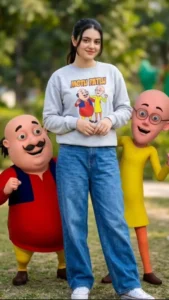
USE THE UPLOADED PHOTO AS THE ONLY FACE REFERENCE. PRESERVE THE PERSON’S IDENTITY WITH AN EXACT FACE MATCH, INCLUDING FACIAL STRUCTURE, JAWLINE, SKIN TONE, HAIRSTYLE, BEARD DETAILS, EYES, NOSE, LIPS, EXPRESSION, AND OVERALL LIKENESS. MAINTAIN PERFECT IDENTITY CONSISTENCY FROM THE REFERENCE IMAGE. DO NOT ALTER, RECREATE, STYLIZE, OR REPLACE THE FACE IN ANY WAY.

CREATE AN ULTRA-REALISTIC FULL-BODY OUTDOOR PORTRAIT OF THE SAME PERSON STANDING CONFIDENTLY IN A RELAXED, STYLISH POSE. HE IS WEARING A COZY LIGHT GREY SWEATSHIRT FEATURING A COLORFUL MOTU PATLU CARTOON PRINT, OVERSIZED BAGGY BLUE JEANS, AND CLEAN WHITE CONVERSE SNEAKERS. HIS EXPRESSION IS CHEERFUL, FRIENDLY, AND NATURAL.

STANDING BESIDE HIM ARE LIFE-SIZE 3D CARTOON CHARACTERS MOTU AND PATLU, DESIGNED EXACTLY LIKE THEIR ANIMATED APPEARANCE, WITH REALISTIC LIGHTING AND DETAILED TEXTURES WHILE MAINTAINING THEIR RECOGNIZABLE CARTOON STYLE. MOTU STANDS ON ONE SIDE WITH A HAPPY SMILE AND PLAYFUL POSE, WHILE PATLU STANDS ON THE OTHER SIDE LOOKING EXCITED AND FRIENDLY. THE CHARACTERS INTERACT NATURALLY WITH THE PERSON AS IF THEY ARE CLOSE FRIENDS POSING TOGETHER FOR A PHOTOGRAPH.

ULTRA-REALISTIC PHOTOGRAPHY, FULL-BODY COMPOSITION, NATURAL DAYLIGHT, CINEMATIC DEPTH OF FIELD, HIGHLY DETAILED SKIN TEXTURE, REALISTIC CLOTHING FABRIC, PROFESSIONAL DSLR QUALITY, SHARP FOCUS ON THE SUBJECT, SOFT BACKGROUND BLUR, VIBRANT COLORS, REALISTIC SHADOWS, OUTDOOR PARK OR CITY LANDMARK ENVIRONMENT, PREMIUM PORTRAIT PHOTOGRAPHY, PHOTOREALISTIC RENDERING.
How To Generate Motu Patalu Ai Image
So, I have given you all the details about this photo editing process; now, let me explain how you can actually create this image. First, copy any of the image prompts provided in the article. Next, select a real photo of yourself to use as a reference—make sure it is a full-body shot where your entire figure is visible and the image quality is good, as this ensures the AI-generated result will also be high-quality. Then, open the ChatGPT app, paste the prompt, and add your photo using the plus (+) icon. Finally, click the generate button and wait a few moments; ChatGPT will process the image and create a new one featuring you alongside the Motu Patlu characters.
Final Words –
So, this is how you can create this trending ‘Motu Patlu’ style photo edit. Since this style is currently going viral, you should definitely give it a try if you want to stay on-trend and easily create new photos. I have provided a detailed guide on the entire process, so you can now follow these steps to create your own edit. If you are interested in creating more trending photo edits like this, feel free to visit our website to find a variety of unique and trending prompts. I hope you have clearly understood everything covered in this article and enjoyed reading it; please do share it.