Sad Ai Photo Editing Prompt – A new photo editing trend is currently going viral on social media where people are creating “sad” themed images. In this style, a melancholic photo of the person is blended with a screenshot of their Instagram profile in the background, resulting in a highly realistic and cinematic look. Creating this is incredibly easy; in this article, I will teach you how to generate these images effortlessly using AI. If you follow this guide, you will get the specific image prompts needed to create these sad-themed photos with ease. So, follow along as I walk you through the entire process.
About This Sad Ai Photo Editing Prompt
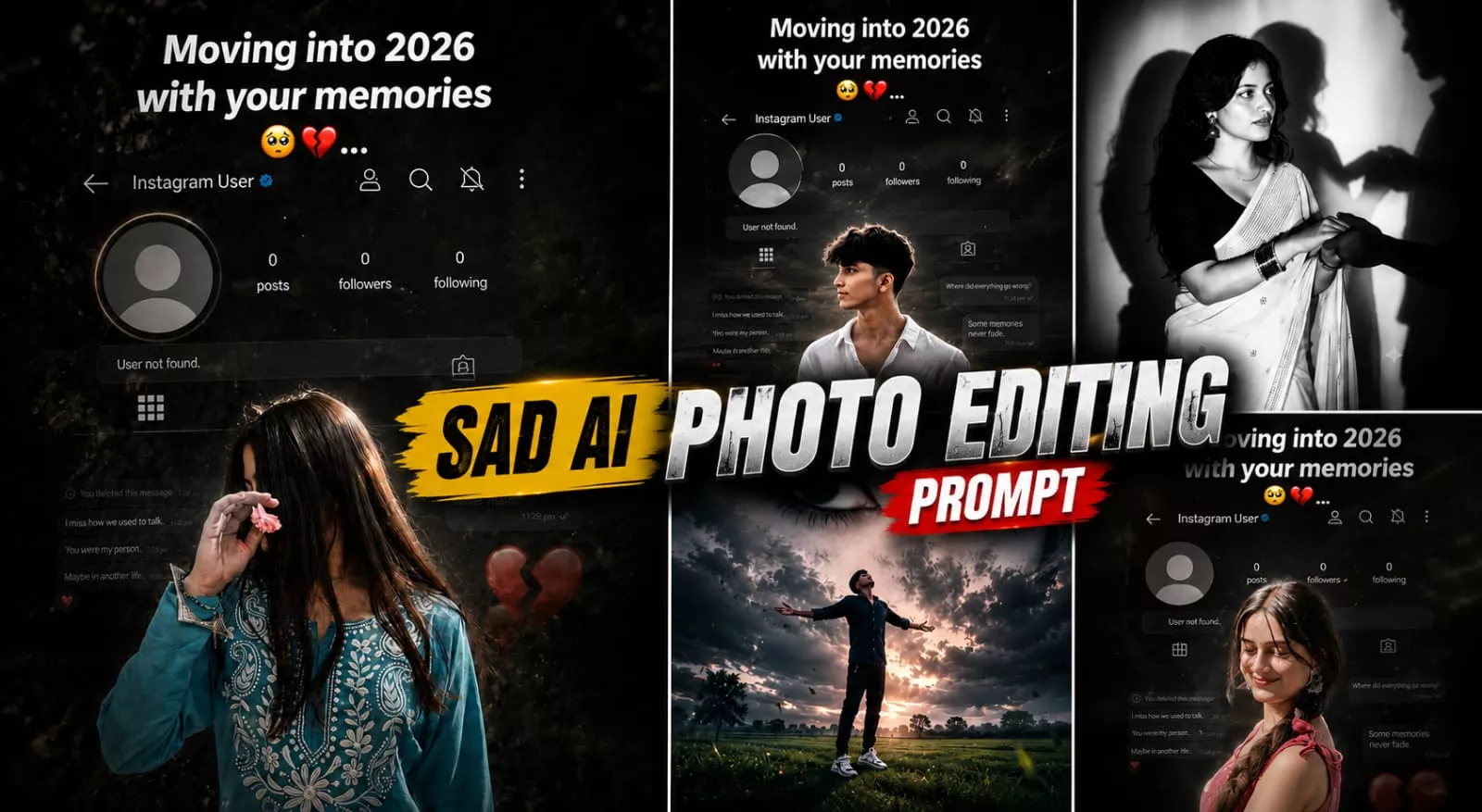
As I mentioned, this is going to be a “sad” photo edit; the resulting image features a highly realistic style, transforming a standard photo into one with a cinematic and aesthetic mood. Both boys and girls can easily create this look using their own photos. The composition involves a “sad” pose against a black-and-white background, blended with an Instagram profile screenshot that shows a follower count of zero—creating the impression that someone has blocked you and you are feeling down while looking at their profile. The image also incorporates a distinctively aesthetic look. While I have detailed this specific edit here, the article includes other images and their corresponding prompts for you to explore.
Why This Photo Editing Is Trendng?
See this photo is trending quite a lot on socialmedia right now and it has been edited and people are liking it because it has made a photo with a sad feeling. He has been touching people for days. And people seeing this photo are remembering such moments related to their own lives or they are remembering their partner. After that, whoever is thinking is making an image of himself with the help of ai. And you know that if an image goes viral many times, it becomes a trend and everyone starts making similar images. The same thing happened with this photo editing. Which is going quite viral right now.
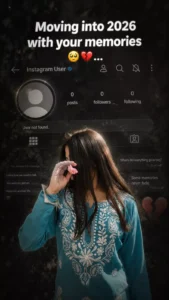
Create a dark, emotional Instagram heartbreak memories edit using the uploaded photo. Keep the person's face, hairstyle, skin tone, body shape, clothes, and pose 100% unchanged. Do not modify identity. Design: • Background should be dark, faded, and slightly blurred. • Add a large semi-transparent Instagram profile interface behind the subject. • Profile picture should appear removed with a default Instagram avatar. • Username: "Instagram User" • Add Profile, Search, Mute, and Options icons. • Use a black and grey color theme with a soft vignette. • Add subtle film grain, motion blur, dust particles, and cinematic lighting. • Place the subject at the bottom center with a soft shadow. Text (large bold white font): "Moving into 2026 with your memories" Below the text add: 🥺💔... Additional effects: • Broken heart emoji 💔 • Sad emoji 🥺 • Faded chat/message overlays in the background. • Instagram aesthetic, nostalgic breakup vibe. • Moody color grading with low saturation. • High contrast, realistic photo edit. • Soft glow around the subject. • Premium viral Instagram reel thumbnail style. • Ultra HD, photorealistic, 4K quality. • No cartoon, no anime, no AI-looking face. • Keep everything natural and cinematic.
Ratio 9:16
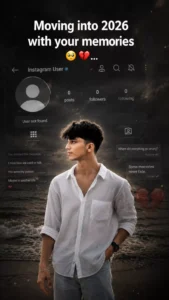
Create a dark, emotional Instagram heartbreak memories edit using the uploaded photo. Keep the person's face, hairstyle, skin tone, body shape, clothes, and pose 100% unchanged. Do not modify identity. Design: • Background should be dark, faded, and slightly blurred. • Add a large semi-transparent Instagram profile interface behind the subject. • Profile picture should appear removed with a default Instagram avatar. • Username: "Instagram User" • Add Profile, Search, Mute, and Options icons. • Use a black and grey color theme with a soft vignette. • Add subtle film grain, motion blur, dust particles, and cinematic lighting. • Place the subject at the bottom center with a soft shadow. Text (large bold white font): "Moving into 2026 with your memories" Below the text add: 🥺💔... Additional effects: • Broken heart emoji 💔 • Sad emoji 🥺 • Faded chat/message overlays in the background. • Instagram aesthetic, nostalgic breakup vibe. • Moody color grading with low saturation. • High contrast, realistic photo edit. • Soft glow around the subject. • Premium viral Instagram reel thumbnail style. • Ultra HD, photorealistic, 4K quality. • No cartoon, no anime, no AI-looking face. • Keep everything natural and cinematic.
Ratio 9:16
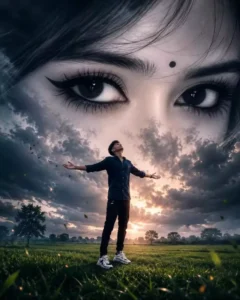
A surreal cinematic digital artwork featuring a lone young man standing in the middle of a vast green grass field under a dramatic overcast sky. He wears a dark navy shirt and loose dark pants, standing with arms Fully outstrethed and head tilted upward, expressing freedom, longing, and emotional surrender. Behind him, dominating the entire sky, is an enormous monochrome female face blended seamlessly into the clouds. The composition focuses on her ultra-detailed expressive eyes, rendered at colossal scale, staring directly forward with deep emotion and melancholy. A small black bindi sits between her eyebrows. Her eyelashes, eyebrows, skin texture, and eye reflections are highly detailed and realistic. The giant face appears ethereal, dreamlike, and ghostly, emerging from storm clouds with soft atmospheric blending. Moody cinematic lighting, dark blue-gray color grading, emotional fantasy atmosphere, dramatic depth, volumet clouds, subtle Fog, ultra-realistic textures. 4:5
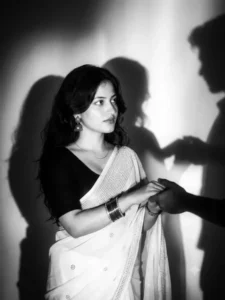
A cinematic, moody black and white editorial photograph of the girl in uploaded 1st picture with dark styled hair, long dark hair, loosely wavy with a few sleek strands falling across the front, wearing white sare with stone work & a matching black half sleeve blouse. Add matching silver oxidise earring, oxidise bangles & a thin sinver chain. The scene features high-contrast lighting with a soft, ethereal glow and halation around the highlights. On the wall behind her, sharp, of silhouetted figures are projected, creating a mysterious and artistic atmosphere. The image has a dreamy, soft-focus quality reminiscent of 90s fashion photography and film noir, complete with subtle film grain." 100% my face same, I need this prompt picture, man shadow hand taking this girl hand, and girl looking her man shadow emotionally with a normal face, don't change my face. Follow for more!
How To Create This Sad Ai Image?
So friends if you want to make a sad image like this for yourself then you first copy the prompt of any image given in this article. Now you open Chatgupt or Google Jaimini. Both are used by the same process.So after opening you copy paste the prompt and take a selfie or image aid with a clear face of yourself from the plus icon. Then click on the Sand button and wait a few moments and it will be ready to become a viral image in which you will see a realistic look in a proper way. You should serve it.
Conclusion
Friends hope that you will definitely like this sad ai photo editing and you will understand the whole process of making it. And you will have no problem creating an image. If you want to make a similar or trending realistic ai image then for its prompt you can visit this website here you will find Yanic or trending image prompt for free.