Chhota Bheem Ai Video Editing Prompt – Friends, a new trend recently went viral on social media where people used AI to create videos featuring the characters Motu and Patlu; these videos showed the characters mentioning the user’s village or city and saying they were about to visit it. Now, a similar trend has emerged involving the character Chhota Bheem. People are creating videos with Chhota Bheem in the same style used for Motu and Patlu, and the results look incredibly realistic and entertaining. If you also want to create a video with Chhota Bheem using AI, it is actually quite easy. In this article, I will guide you through the entire process and provide specific AI prompts that will help you create fantastic, creative videos featuring Chhota Bheem. So, follow along as I explain the steps.
Details Of Chhota Bheem Ai Video Editing Prompt
Regarding this video editing—as I mentioned, it involves the character Chhota Bheem. Using AI, the character is made to speak in a way that looks completely realistic, just like he does in the TV show. Much like the recent trend where characters like Motu and Patlu would say your city’s name or your own name, Chhota Bheem can now do the same; such videos are currently very popular. You can easily create this yourself. I am sharing the necessary prompt in this article, which you can use to generate the video. To create this AI video featuring Chhota Bheem, you first need to generate an image—whether you want the video to feature your name or your city’s name—and then use that image to generate the video. I will explain the full process in the following paragraph.
Editing Process Of Chhota Bheem Video:
Friends, the process of creating this video is quite simple. First, you need to generate an image, which will then be used to create the video. In this article, I am providing both the image prompt and the video prompt. Let me explain how to generate the image: start by copying any image prompt from this article—choose the one that matches the style of video you want to create. After copying the prompt, open the ChatGPT application, paste the prompt, and generate the image. Make sure to replace the placeholder name with your own before generating it. This will produce an image featuring the Chhota Bheem character along with your name, your city’s name, or even you yourself, depending on the details you included in the prompt. Now, we will move on to generating the video from this image; you can read about that process in the next paragraph.
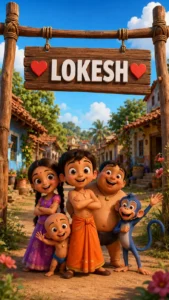
Image Prompt –
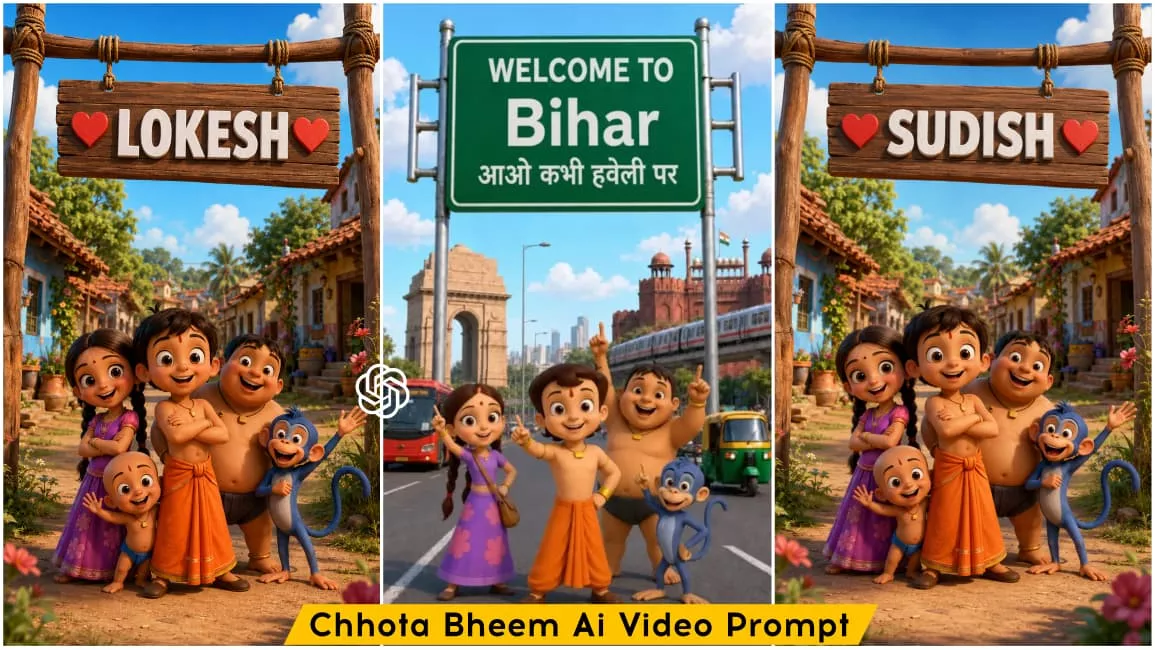
Create a high-quality 3D cartoon-style scene inspired by classic Indian animation. A cheerful group of adventurous village kids stands under a rustic wooden hanging signboard in the middle of a beautiful Indian village street. The group includes a brave young boy in an orange dhoti, a girl in a purple dress, a chubby boy, a small playful child, and a mischievous blue monkey. All are smiling happily, facing the camera, and posing joyfully with friendly expressions.

The wooden signboard is suspended with thick ropes between two rustic wooden poles. On the signboard, display the text:

❤️ [RAJAN] ❤️

With bold white 3D font, centered alignment, red heart icons on both sides, identical size, spacing, perspective, lighting, shadows, and wooden texture. Keep everything else exactly the same.

Background: A traditional Indian village with tiled-roof houses on both sides, lush green trees, colorful flowers, a dirt pathway, warm golden sunlight, blue sky with soft white clouds, cinematic composition, vibrant colors, ultra-detailed textures, realistic lighting, shallow depth of field, HDR, Pixar-quality 3D animation, Ultra HD, 8K.

Style: Premium 3D cartoon render inspired by classic Indian animated adventures, smooth textures, expressive faces, cinematic lighting, highly detailed environment, professional animation quality.

Vertical composition, 9:16 aspect ratio.
Video Prompt –
Create a 10-second ultra-realistic 3D animated Video using the uploaded image as the exact reference. Keep Chhota Bheem and his group, their clothes, expressions, and the highway background unchanged. Add natural lip-sync, blinking, facial expressions, hand gestures, and slight handheld camera movement. Chhota Bheem smiles, waves, and says: "दोस्तों, अब हमें राजन भाई से मिलने जाना है।
Now Chutki speaks." "तो जल्दी से इस वीडियो को चार लोगों के पास शेयर कर दो!"
Now Chhota Bheem speaks. "अगर अपने नाम की वीडियो बनवाना चाहते हो तो इस वीडियो को लाइक करके comment में अपना नाम लिख दो!" Add realistic highway ambience, passing vehicles, birds, light wind, cinematic lighting, smooth animation, 4K, vertical 9:16.
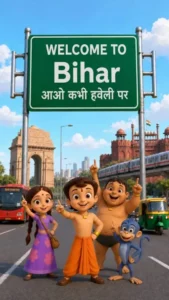
Create a high-quality 3D cartoon-style scene inspired by classic Indian animation. Chhota Bheem and his friends stand in the middle of a wide modern Indian city road, smiling and pointing upward. Place Chhota Bheem confidently in the center, with Chutki on the left, Raju on the right, Jaggu the monkey near the front, and Kalia standing slightly behind. All characters have cheerful expressions and dynamic poses, looking toward the camera while pointing upward.

Behind them is a large green highway signboard supported by two silver poles. The signboard has a white border and bold white text exactly as follows:

WELCOME TO
Bihar
आओ कभी हवेली पर

The text must be perfectly centered, sharp, correctly spelled, and use realistic Indian highway sign typography.

Background: A busy Indian city featuring India Gate on the left, Red Fort on the right, a metro train on an elevated track, red city buses, auto-rickshaws, motorcycles, cars, streetlights, trees, and a bright blue sky with soft white clouds.

Camera angle: Eye-level, wide-angle, centered composition.

Lighting: Bright natural daylight with soft realistic shadows.

Style: Ultra-detailed Pixar-quality 3D cartoon render inspired by classic Indian animation, vibrant colors, smooth textures, cinematic lighting, depth of field, Ultra HD, 8K, highly detailed, professional animation quality.

Vertical composition (9:16), realistic road markings, clean perspective, sharp focus, vibrant colors.
Video Prompt –
Animate the existing image only. Keep the characters, background, camera angle, road, Bihar signboard, lighting, and overall composition completely unchanged. Do not replace or redesign any character. Preserve the exact appearance, colors, proportions, and positions throughout the animation.

Apply natural facial expressions, realistic eye blinking, subtle breathing, gentle body movement, accurate Hindi lip-sync, and smooth hand gestures. Keep the animation stable with no flickering, morphing, character swapping, or camera movement.

Chhota Bheem (speaking in Hindi):
"अरे दोस्तों, देखो! हम बिहार पहुँच गए!"

Chutki (speaking in Hindi):
"हाँ भीम, चलो सबसे पहले लिट्टी-चोखा खाते हैं!"

Kalia (laughing):
"वाह! आज तो दावत होने वाली है!"

At the end, Chhota Bheem, Chutki, Raju, Jaggu, and Kalia all smile together, point toward the "WELCOME TO Bihar" signboard, laugh naturally, and maintain perfect Hindi lip-sync with synchronized expressions.

Animation style: Smooth cinematic character animation, Pixar-quality 3D, realistic facial acting, natural head movement, accurate hand gestures, high-quality lip-sync, soft secondary motion, 24 fps, Ultra HD 4K, 8 seconds, stable frame-to-frame consistency, no camera shake, no zoom, no cuts, no scene transitions.
How To Generate This Video?
By now, you likely understand the process of generating the image. In this paragraph, I will explain how to create a video from that generated image. First, create the image in the style you want for your video. Next, copy the video prompt provided in this article and click the “Generate Video” button; this will take you directly to the Google Flow website, where the video generation happens. Here, log in using your email, select the “New Project” option, set the video aspect ratio to 9:16, and click the plus (+) icon in the top corner. Then, add the image you created earlier, paste the video prompt, and hit generate. Within a short time, your “Chhota Bheem” style video will be ready, and you can save it.
Conclusion
So friends, this is how you can easily create videos featuring Chhota Bheem instead of the viral Motu Patlu ones. Since this trend is brand new, creating your own videos in this style significantly increases your chances of going viral; after all, Motu Patlu videos previously took social media by storm and achieved massive viral success. Now that Chhota Bheem videos are being edited in this same style, they are likely to spark a huge trend and go viral as well. I hope you have understood the process and can easily edit your own Chhota Bheem videos; the entire process is completely free and can be done right on your phone. Keep visiting our website to learn more about unique and trending video editing techniques—we’ll teach you how to create videos based on the latest trends.