Eye Close Up Ai Photo Editing Prompt – Hello friends, welcome to today’s article. In today’s article, I’m going to teach you how to do a viral photo editing technique. You may have noticed on social media that a photo editing technique is currently going viral, involving eye close-ups. This is a romantic couple photo editing technique. So, if you want to create a romantic photo with your partner, or if you want to create an eye close-up, then you should read this article. In this article, I’m going to teach you how to create this photo using eye. With its help, you’ll be able to easily create this realistic photo from a selfie. If you share your photo with me, it’s trending on social media right now. If you share your photo, it will increase your chances of going viral. So, friends, follow this article and I’ll explain the process.
Details Of Eye Close Up Ai Photo Editing Prompt
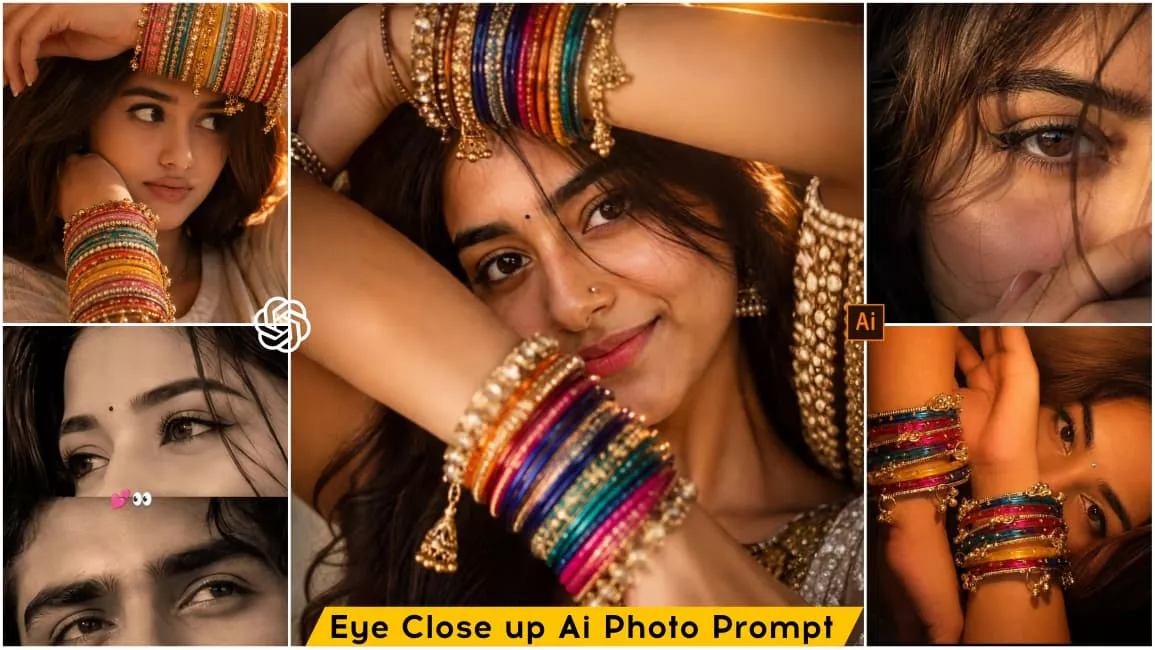
Talking about support editing, friends, this photo editing is going to be eye close-up photo editing and romantic photo editing. As I told you, you’ll get the opportunity to create different types of photos. You’ll easily be able to create couples’ or singles’ images. You’ll notice that in some images, you and your partner are taking a romantic close-up selfie. In others, you’ll be seen wearing green bangles and posing stylishly in front of the camera. In others, you’ll be seen resting your head on a table, looking into the camera. This is going to be photo editing in a cinematic look. You can easily create such different images. I’m providing you with prompts in this article. You’ll need to create them using the prompts. However, you’ll need to read the process first, then easily create your own image using the prompts.
How To Create This Image Using Ai?
Friends, let me tell you how to create this trending photo. For this, first of all you have to copy any image given in the article. After that, if you click on the Create Your Image button given in the article, you will directly go to the Chatgpt website or you can also do it through Google Gemini, the method of doing it for both is exactly the same. So after copying the prompt, open the application and first paste the prompt in it, then add your reference image using the plus icon. If you want to make a couple image, then add an image with your partner or add a single image and click on the generate button. After waiting for a few moments, your eye close up photo will be ready. And you can save it.
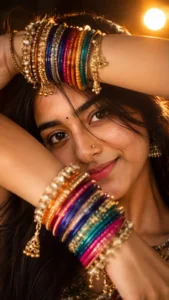
PROMPT:Create an ultra-realistic cinematic vertical 9:16 portrait using the uploaded reference photo of the person as a STRICT IDENTITY REFERENCE.IDENTITY — HIGHEST PRIORITYPreserve the uploaded person's exact recognizable identity with maximum accuracy. Keep their natural facial structure, face shape, forehead, eyebrows, eyes, eye shape, nose, lips, cheeks, jawline, skin tone, skin texture, hairline, hairstyle, hair texture, and all unique facial characteristics exactly consistent with the reference image.Do not beautify, redesign, replace, slim, reshape, age, de-age, feminize, masculinize, or otherwise alter the person's identity. The person in the generated image must clearly be the same person from the uploaded reference.EXACT COMPOSITIONRecreate the reference image's composition and visual arrangement as closely as possible.Create a close-up artistic portrait of the person lying sideways with their face positioned toward the right side of the frame. The camera is extremely close to the subject, creating an intimate macro-style composition.The person's face is partially framed and partially hidden behind their raised arms. Both forearms/hands are positioned dramatically across the face, creating layered foreground depth.One arm crosses horizontally through the upper portion of the image, while another arm rises vertically/diagonally near the center of the frame. The eyes remain clearly visible between the arms.The person's gaze is directed naturally toward the camera with an intense, soft, emotional expression.JEWELRYCover both wrists with many layers of traditional colorful Indian glass bangles.Use a rich mixture of:deep blueturquoisebright pinkmagentagolden yelloworangeredmetallic goldAdd intricate traditional golden decorative bangle elements, tiny hanging gold charms, beads, chains, and ornate details between the colorful bangles.The bangles should look physically realistic, highly detailed, reflective, layered, and naturally fitted around the wrists.FACE & DETAILSKeep the person's natural facial appearance from the uploaded reference.Add a tiny elegant silver/diamond-style nose stud on the nose only if it naturally suits the reference person.Maintain realistic eyelashes, eyebrows, pores, fine facial texture, natural eye reflections, and subtle imperfections.Do not make the skin plastic or overly smooth.HAIRKeep the reference person's hairstyle and hair texture consistent.The hair should spread naturally around the head in the background, with individual strands visible. Add realistic warm highlights from the surrounding light.LIGHTINGRecreate the dramatic warm cinematic lighting of the reference.Use a strong warm orange/golden light source coming from the upper-right/background area, producing a bright glowing flare and illuminating the face, arms, and bangles.Create:warm amber skin illuminationstrong golden highlightssoft shadowscinematic contrastsubtle lens flarerealistic light falloffglowing highlights around the hairnatural reflections on the banglesThe background should be dark, warm brown/black, softly blurred, and atmospheric.CAMERA & PHOTOGRAPHYExtreme close-up portrait photography.Vertical 9:16 composition.Professional DSLR/mirrorless look, approximately 85mm–105mm portrait lens, shallow depth of field, wide aperture around f/1.8–f/2.0.Sharp focus primarily on the eyes and facial details, with realistic depth-of-field falloff toward the foreground bangles and background.Ultra-realistic skin texture, realistic optical rendering, natural bokeh, cinematic color grading, high dynamic range, professional editorial photography.COLOR & MOODWarm Indian festive aesthetic mixed with dramatic cinematic portrait photography.Rich orange and golden tones with vibrant jewel-colored bangles.The final image should feel luxurious, emotional, mysterious, intimate, tradit…
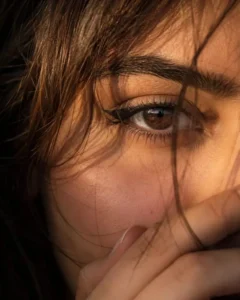
Ultra-realistic cinematic extreme close-up portrait of a young woman’s single eye filling most of the frame, captured in warm golden-hour sunlight. Focus on one deep brown eye with sharp reflections and natural catchlights, long delicate eyelashes, bold black winged eyeliner, smooth eyelid makeup with soft nude tones, thick naturally shaped dark eyebrow with visible hair texture and fine details. Skin appears soft and highly detailed with realistic pores, subtle blush on the cheek, natural warm skin tone illuminated by golden sunlight. A few loose strands of slightly reddish-brown hair gently fall across the face and eye, creating a dreamy mood. Part of her hand softly covers the lower face near the lips, adding mystery and emotion. Cinematic lighting with warm amber tones, shallow depth of field, ultra-detailed skin texture, soft shadows, natural facial details, photorealistic beauty portrait, DSLR quality, 85mm lens, f/1.4, ultra HD, 4K, highly realistic, artistic editorial photography style.Negative prompt:blurry eyes, extra eyes, distorted face, low quality, overexposed lighting, unrealistic skin, plastic skin texture, extra fingers, duplicate features, heavy makeup, cartoon style, deformed anatomy, low resolution, noisy image, unnatural colors.
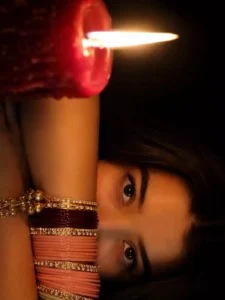
Prompt : Create Ultra-realistic cinematic closeup low-light portrait of a woman (the reference image given)sitting in complete darkness, illuminated only by a single burning red candle placed very close to the camera on the left side of the frame.The portrait is a close-up composition where both forearms are crossed horizontally in front of her face, hiding the lower half of her face so that only her eyes, eyebrows, forehead visible.She gazes directly into the camera with calm, eyes.Both arms filled with stack of maroon, light pink, light green , white glass bangles and hanging charm(ghungroo )bangles.Warm golden-brown complexion of skin, no makeup only thin eyeliner on one burning wax candle,dramatic chiaroscuro,deep black background.16:9 ratio
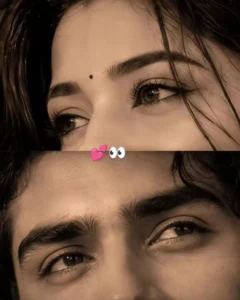
Use ONLY the uploaded reference images. Create an ultra-realistic cinematic split-frame portrait showing ONLY the eyes. A sharp horizontal line divides the frame exactly at the center. TOP HALF: Only the woman's eyes with thick natural eyebrows, subtle winged eyeliner, small black bindi visible above the brows, original eye shape, skin texture, and gaze preserved exactly.BOTTOM HALF: Only the man's eyes with messy black hair slightly falling over the forehead, thick eyebrows, sharp expressive eyes looking upward, original identity and skin texture preserved exactly. Crop tightly from forehead to just below the eyes. No nose, lips, or cheeks visible. Perfect facial alignment across the split.Monochrome sepia color grading, soft cinematic editorial lighting, HDR, ultra-detailed skin texture, DSLR 85mm lens, f/1.8, shallow depth of field, 8K, photorealistic, 4:5 aspect ratio. STRICT IDENTITY LOCK. Do not change facial features, eye shape, eyebrows, or hairstyle.
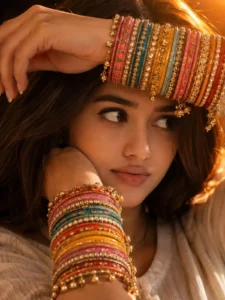
PROMPT:Create an ultra-realistic cinematic vertical 9:16 portrait using the uploaded reference photo of the person as a STRICT IDENTITY REFERENCE.IDENTITY — HIGHEST PRIORITYPreserve the uploaded person's exact recognizable identity with maximum accuracy. Keep their natural facial structure, face shape, forehead, eyebrows, eyes, eye shape, nose, lips, cheeks, jawline, skin tone, skin texture, hairline, hairstyle, hair texture, and all unique facial characteristics exactly consistent with the reference image.Do not beautify, redesign, replace, slim, reshape, age, de-age, feminize, masculinize, or otherwise alter the person's identity. The person in the generated image must clearly be the same person from the uploaded reference.EXACT COMPOSITIONRecreate the reference image's composition and visual arrangement as closely as possible.Create a close-up artistic portrait of the person lying sideways with their face positioned toward the right side of the frame. The camera is extremely close to the subject, creating an intimate macro-style composition.The person's face is partially framed and partially hidden behind their raised arms. Both forearms/hands are positioned dramatically across the face, creating layered foreground depth.One arm crosses horizontally through the upper portion of the image, while another arm rises vertically/diagonally near the center of the frame. The eyes remain clearly visible between the arms.The person's gaze is directed naturally toward the camera with an intense, soft, emotional expression.JEWELRYCover both wrists with many layers of traditional colorful Indian glass bangles.Use a rich mixture of:deep blueturquoisebright pinkmagentagolden yelloworangeredmetallic goldAdd intricate traditional golden decorative bangle elements, tiny hanging gold charms, beads, chains, and ornate details between the colorful bangles.The bangles should look physically realistic, highly detailed, reflective, layered, and naturally fitted around the wrists.FACE & DETAILSKeep the person's natural facial appearance from the uploaded reference.Add a tiny elegant silver/diamond-style nose stud on the nose only if it naturally suits the reference person.Maintain realistic eyelashes, eyebrows, pores, fine facial texture, natural eye reflections, and subtle imperfections.Do not make the skin plastic or overly smooth.HAIRKeep the reference person's hairstyle and hair texture consistent.The hair should spread naturally around the head in the background, with individual strands visible. Add realistic warm highlights from the surrounding light.LIGHTINGRecreate the dramatic warm cinematic lighting of the reference.Use a strong warm orange/golden light source coming from the upper-right/background area, producing a bright glowing flare and illuminating the face, arms, and bangles.Create:warm amber skin illuminationstrong golden highlightssoft shadowscinematic contrastsubtle lens flarerealistic light falloffglowing highlights around the hairnatural reflections on the banglesThe background should be dark, warm brown/black, softly blurred, and atmospheric.CAMERA & PHOTOGRAPHYExtreme close-up portrait photography.Vertical 9:16 composition.Professional DSLR/mirrorless look, approximately 85mm–105mm portrait lens, shallow depth of field, wide aperture around f/1.8–f/2.0.Sharp focus primarily on the eyes and facial details, with realistic depth-of-field falloff toward the foreground bangles and background.Ultra-realistic skin texture, realistic optical rendering, natural bokeh, cinematic color grading, high dynamic range, professional editorial photography.COLOR & MOODWarm Indian festive aesthetic mixed with dramatic cinematic portrait photography.Rich orange and golden tones with vibrant jewel-colored bangles.The final image should feel luxurious, emotional, mysterious, intimate, tradit…
Choose the Perfect Shot for Unique and Stylish Images
The most important thing to consider when using such prompts to generate photos is that different scenarios call for different types of images. For instance, some prompts might require a full-body shot, while others work better with a half-body or close-up shot. Take a foggy setting, for example: using a full-body shot allows the background environment to blend in naturally with the fog. Conversely, a half-body shot can look incredibly polished and perfect when rendered in that same style. Therefore, you need to use your judgment to decide which type of shot works best for a given prompt, ensuring the final result is truly unique and stylish.
Conclusion
So friends, this way you can easily create this viral eye close-up AI photo. I hope you’ll enjoy this photo editing and won’t have any problems creating it. If you have any questions or need editing for any other topic, feel free to leave a comment and we’ll do our best to help. If you liked the article, please share it.