Wedding Bridal Look Ai Photo Editing Prompt – Friends, right now, various types of AI-generated images are trending on social media—images that look absolutely real. And the best part is, creating these kinds of realistic images is actually quite simple. Currently, a new trend is sweeping through social media where everyone is transforming their regular photos into a “bridal look.” This trend is particularly popular among women. It is especially appealing if you are single and unmarried, yet curious to see how you might look after tying the knot; this photo editing technique will help you do just that. It allows you to visualize yourself looking exactly like a newlywed bride who has just tied the knot. So, if you too wish to try out this viral bridal photo editing trend, I am going to teach you exactly how to perform this AI edit in today’s article. Simply follow along with this guide, and you will learn how to generate your own images using the specific prompt provided.
About This Wedding Bridal Look Ai Photo Editing Prompt
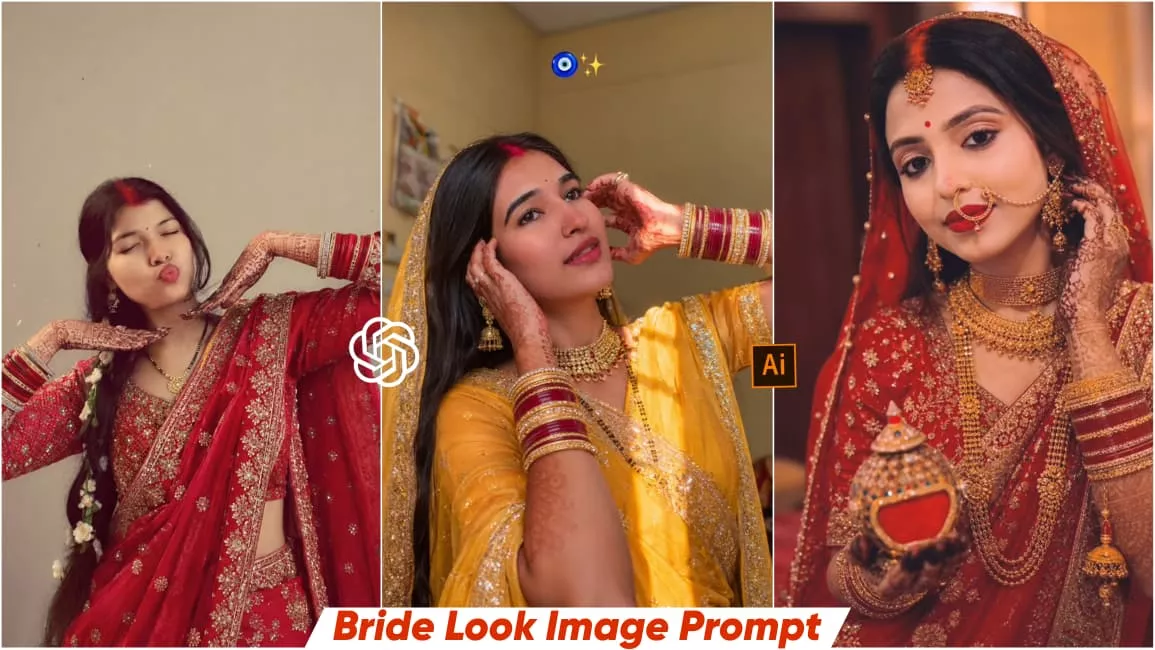
As I mentioned earlier, this photo edit is designed to give you a “wedding look.” Your original, ordinary photograph will be transformed into the image of a bride. In this edited image, you will appear adorned in traditional red bridal jewelry and makeup, complete with sindoor (vermilion) applied to your forehead—just like a traditional Indian bride. Your hands will be embellished with bangles and intricate mehndi designs, resulting in a perfectly crafted image that captures the essence of a bride. This editing process will completely transform the narrative of your photograph, turning a simple snapshot into a stunning masterpiece. Best of all, you can create this look with absolute ease using just a simple prompt. In this article, I have provided several image prompts that you can use to generate your own stunning bridal images.
Best Ai tool For Generating Images
Friends, nowadays you can find various tools available for creating AI images, allowing you to generate them with ease. In the past, we used to rely on multiple separate applications just to perform basic photo editing; however, you can now effortlessly create your images within a single application—simply by providing a text prompt and clicking a button. As you are likely aware, people on social media these days are using tools like ChatGPT or Gemini to generate their images, and they are also sharing tutorials to show others how they too can utilize these tools to create their own visuals. Therefore, friends, I would offer you the same advice: you can effectively create your images by using either ChatGPT or Gemini. Currently, ChatGPT is capable of generating truly unique images, and you too can leverage it to generate your own AI-powered visuals.
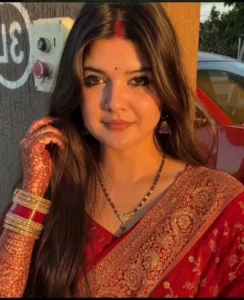
Keep my face 100% same, Imagine me as a up/bihari bride wearing a red saree and having sindoor on her forehead.She's newly wed.Put her mehendi on her palm, mangalsutra on her neck. Make the photo in high definition.Make it look realistic and don't change the facial features
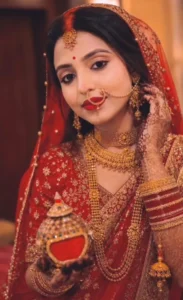
A realistic Indian bridal portrait of a young woman, wearing a traditional red Banarasi saree with heavy sequence work in her saree border with intricate golden embroidery and heavy bridal red Banarasi blouse with sequence work design. She is adorned with heavy bridal gold jewellery including a gold choker, long necklace, earrings, bangles, and a maang tikka and nath look like UP or Bihar Bride. She is adorned with traditional heavy gold bridal jewelry including layered necklaces, choker, earrings, bangles, and a large nath (nose ring with chain). She has dark orange sindoor in her hair parting and sindoor little bit spread in her nose also and a red bindi on her forehead. Her hands are decorated with detailed mehendi (henna) in her both hand, and she is holding a sindoor dan with cap like bihar bride in which orange sindoor. She is holding a decorated sindoor container (sindoor dan) with colorful stones and gold detailing. Her makeup is soft glam with bold red lipstick and glowing skin. Her left hand touches her ear gently to gives pose on photo. She wear gold nose pin like bride. She is smiling gently and looking at the camera. Background photo of any shadi lawn room like she newly married and at background hotel room she stand and give pose. Bride makeup like newly bride. Background is warm indoor setting with soft lighting, giving a royal and elegant feel. Lighting is warm, cinematic, and soft, with a shallow depth of field and blurred festive background (bukeh lights, wedding decor), rich colors, dramatic lighting. Ultra-realistic, high detail, 4K portrait, soft focus, professional photography style.
How To Create This Ai Image Using Chatgpt?
Look, creating images with ChatGPT is incredibly easy; you can generate your own images for free in just a few simple steps. First, you will need a prompt, so go ahead and copy the “bride” prompt provided in this article. Next, install the ChatGPT application from the Play Store and launch it. Now, log in to the app, paste the prompt, and add your image. Since you will be providing the image for reference, tap the plus icon to upload it; then, hit send and wait for a few moments. ChatGPT will then generate that realistic “bride” image for you. And just like that, you can create your very own trending image.
Outcome –
Nowadays, with the help of AI, you can easily create any type of image within just a few minutes. Friends, if you are able to write your own prompts, you can use an AI tool to generate exactly the kind of image you envision. On this website of mine, you will find a variety of image prompts that you can use to create your own trending images. I hope you enjoyed today’s photo editing tutorial and that you will be able to easily create your own “bride-look” images. Please be sure to share your feedback with us in the comments section. You can also visit our website to explore and discover more unique photo editing ideas like this one.