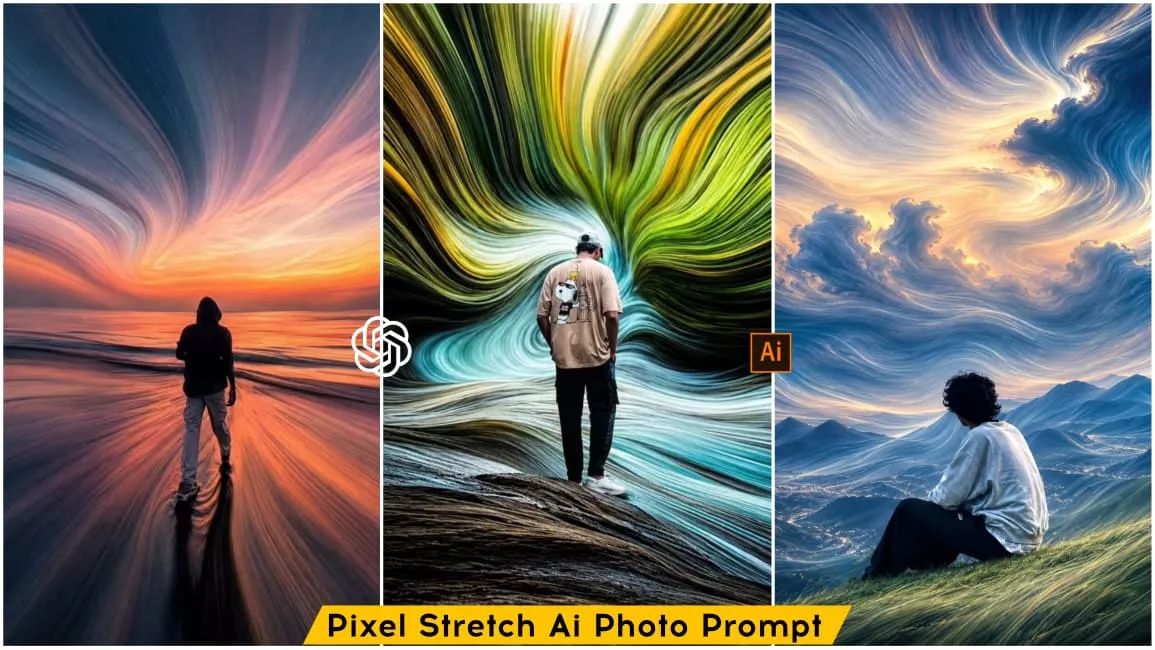
Pixel Stretch Ai Photo Editing Prompt – Friends, a new photo editing style is currently trending on social media, created using AI. You have likely seen the popularity of these “pixel stretch” photos, where a standard image is stretched to highlight the subject’s body; you can easily create such a photo yourself with just one click using AI. In this article, I will teach you how to create this viral pixel stretch effect so you can easily make one for yourself. The process is simple—if you want to create a pixel stretch photo, just read this article to find out how.
About This Pixel Stretch Ai Photo Editing Prompt
Let’s talk about this photo editing style: you start with a standard photo and apply a “pixel stretch” effect to achieve an aesthetic look. While your body remains untouched, the background is stretched—creating the impression that the background has been pulled toward your body, effectively focusing all attention on you. This pixel-stretch technique, combined with the aesthetic style, makes the image look incredibly captivating. You can create this photo using a prompt; simply upload a reference image and paste the prompt into the AI tool to generate the final pixel-stretched image. I will explain the process in the following paragraph, so please keep reading.
Select Right Photo For Best Result
People often think that AI tools are the most important factor for achieving great results; while that is true, selecting the right photo is equally crucial. If you don’t choose the right photo from the start, even the best tool won’t be able to deliver excellent results. Therefore, selecting a photo that aligns with your editing style right from the beginning ensures you always get outstanding outcomes.
For instance, for this specific style, you should choose a photo where both the subject and the background are clearly defined; this ensures the ‘stretch’ effect can be applied effectively to your image. A full-body shot with a distinct background or an image with an aesthetic look works best, as this allows the stretch effect to enhance the image beautifully.
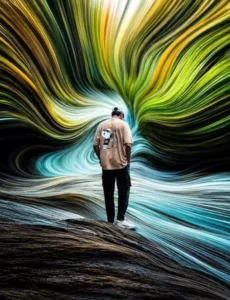
Transform the uploaded image into a premium pixel stretch artwork while keeping the main subject perfectly sharp, detailed, and recognizable. Extract colors and textures from the subject and extend them into smooth, flowing pixel-stretch ribbons that follow elegant curves and dynamic motion.Create seamless transitions between the original image and stretched areas, avoiding glitches or harsh edges. The stretched pixels should appear silky, fluid, and organic, like streams of color, light, paint, or energy. Maintain realistic lighting, depth, shadows, and color harmony. Use cinematic contrast, vibrant colors, HDR quality, ultra-sharp details, modern minimalist composition, luxury digital art styling, Adobe Photoshop pixel stretch effect, gallery-quality finishing, and ultra-high-resolution 8K for a visually captivating, social-media-ready masterpiece.
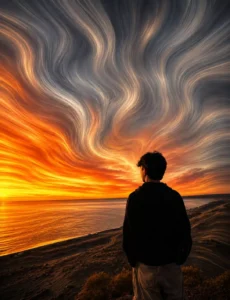
pixel stretch artwork while keeping the main subject perfectly sharp, detailed, and recognizable. Extract colors and textures from the subject and extend them into smooth, flowing pixel-stretch ribbons that follow elegant curves and dynamic motion. Create seamless transitions between the original image and stretched areas, avoiding glitches or harsh edges. The stretched pixels should appear silky, fluid, and organic, like streams of color, light, paint, or energy. Maintain realistic lighting, depth, shadows, and color harmony. Use cinematic contrast,vibrant colors, HDR quality, ultra-sharp details, modern minimalist composition, luxury digital art styling, Adobe Photoshop pixel stretch effect, gallery-quality finishing, and ultra-high-resolution 8K for a visually captivating, social-media-ready masterpiece.
How To Create Image Using Chatgpt?
So, friends, now that you have the prompt for the stretch effect, here is how to use it to create your image: simply copy the prompt provided in the article and use the ChatGPT app. You can find the ChatGPT app on the Play Store; open it, paste the copied prompt, and then add your reference image. Use the plus icon to upload the reference image to which you want to apply the pixel stretch effect. Finally, click the generate button, wait a few moments, and your image will be ready.
Conclusion
Friends, this is how you can easily create this viral “pixel stretch” photo edit using your own photos. The article provides a clear guide; simply follow the steps and use the prompts to generate your image. If you are looking for more unique and trending image prompts, do visit our website, where you will find a collection of trending photo prompts. We hope you enjoyed this article—please be sure to share it.