3 Layer Collage Aesthetic Ai Photo Editing Prompt – Hello friends, and welcome to this new article. In today’s post, I am going to teach you how to create a viral AI-generated photo. If you are active on Instagram or other social media platforms, you have likely come across this type of viral photo editing. People are creating and sharing these realistic, trending images using AI, and they are going viral. If you want to create similar realistic photos that have the potential to go viral, then you need to read this article. Here, I will guide you through the entire process of creating this type of image. I will also provide the image prompt you need to generate these realistic photos. Simply follow the steps outlined in this article to easily create your own trending AI-generated images. Let’s get started.
About 3 Layer Collage Aesthetic Ai Photo Editing Prompt
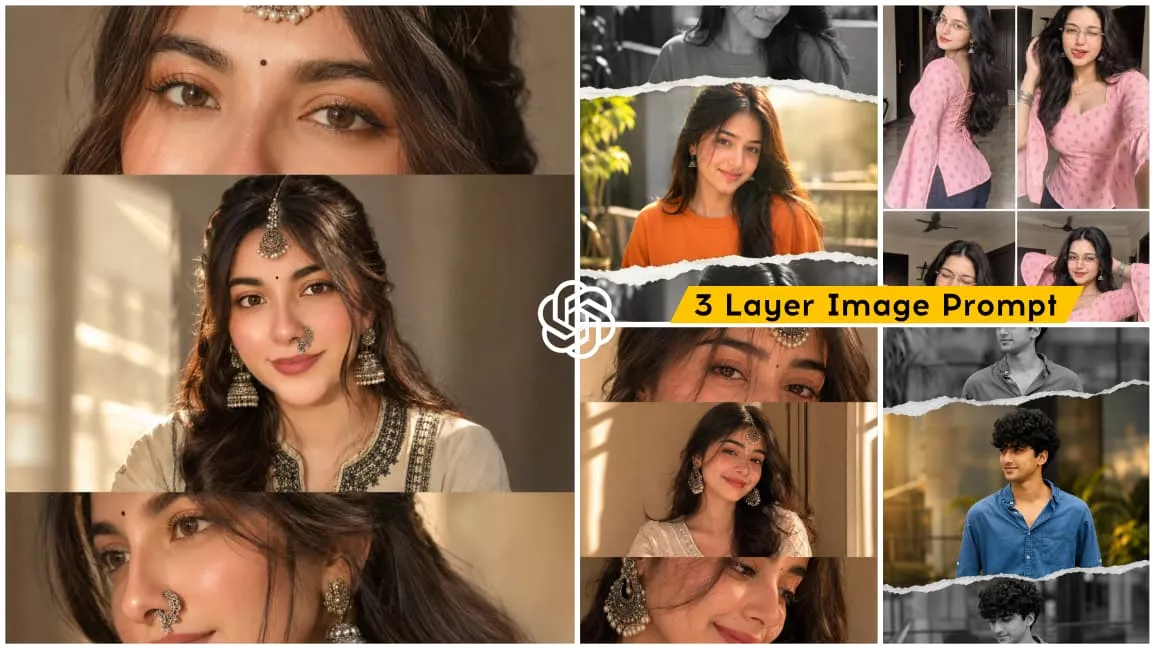
Let’s talk about this photo editing style, which features a three-layer composition. It creates a realistic AI image using a single photo of yours, arranged across three distinct layers: the first layer shows a close-up of your eyes; the second displays a half-body shot where your face is visible; and the third features a side-profile view of you smiling. Various prompts are provided for different styles of this multi-layered editing. You can easily create your own image using any of the prompts listed in this article; the step-by-step process is explained in the following paragraph.
Why This Editing Is Going Viral?
This style of photo editing is currently going viral on social media because the realistic look achieved through the editing appeals to so many people. Everyone loves this kind of natural, aesthetic vibe, which is why this specific editing style is resonating with audiences and causing these photos to go viral. You can transform a standard photo into a three-layered image where you appear with distinct expressions across the layers—smiling in one, adopting a different look in the second, and another in the third. It creates a single image featuring three different expressions, and since it is incredibly easy to create using AI, people are sharing these photos widely, making them a massive viral trend.
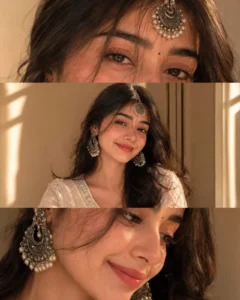
Use the uploaded reference image as the identity reference. Preserve the face, eye shape, skin tone, hairstyle, and facial features 100% exactly.

Create a premium vertical 3-panel collage.

Top panel: Close-up from behind/right side with the face mostly hidden (only a tiny cheek or jawline visible), focus on a large oxidized silver jhumka, hand gently touching the ear, stacked oxidized silver bangles, soft black kajal barely visible, loose hair strands, warm golden sunlight, creamy bokeh, shallow depth of field.

Middle panel (main focus): Ultra-realistic extreme macro close-up of both eyes with bold black kajal, subtle winged eyeliner, long natural eyelashes, thick eyebrows, glossy deep brown eyes, crystal-clear catchlights, tiny black bindi, flawless skin texture, DSLR macro photography.

Bottom panel: Lower half of the face with a soft smile, white embroidered cotton kurta, wrist resting near the face displaying oxidized silver bangles, loose hair strands, warm golden-hour lighting, soft creamy bokeh.

Photorealistic, luxury fashion editorial, Canon EOS R5, 85mm lens, f/1.8, HDR, ultra-detailed skin texture, realistic lighting, premium Instagram aesthetic, clean 3-panel layout, 8K, ultra-sharp.
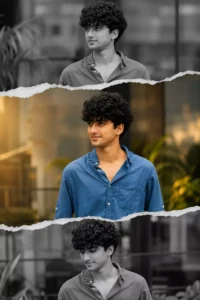
Create a stylish masculine collage portrait using the uploaded photo.

Split the image into 3 horizontal torn-paper sections stacked vertically.

The middle section should be in full color, showing a confident expression with natural golden-hour sunlight illuminating the face.

The top and bottom sections should be in black & white, featuring slightly different angles or subtle expressions from the same photo for a cinematic storytelling effect.

Add highly realistic torn-paper edges between each section with natural paper texture.

Keep the background softly blurred with an outdoor urban, balcony, or greenery setting to create depth while maintaining focus on the subject.

Enhance the lighting with warm golden-hour tones for a premium cinematic Instagram aesthetic.

Maintain the exact facial identity, natural skin tone, sharp facial features, and realistic skin texture.

Add subtle contrast, soft shadows, and depth to create a high-end editorial look.

Apply clean color grading with rich blacks, crisp highlights, and balanced warm tones.

Style: modern masculine aesthetic, cinematic, premium, luxury Instagram reel/post style, ultra-realistic, DSLR quality, 85mm portrait lens, shallow depth of field, soft natural bokeh, high-detail, 8K.
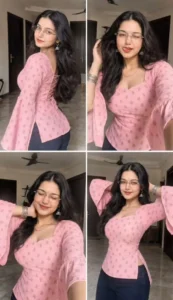
Create an ultra-realistic 9:16 portrait image with a 2×2 Instagram-style collage (2 photos on top, 2 on bottom, thin white borders). Use the uploaded face as the exact identity reference and keep the face, skin tone, features, body proportions, and transparent glasses identical in all frames. Remove any flower. Modern Indian home background with soft daylight, cream walls, dark wooden doors, tiled floor, and ceiling fan. Outfit: soft pastel pink fitted short kurti (sweetheart neckline, bell sleeves, corset back, side slits) with the same tiny mustard-gold and rust floral buta prints as the reference, paired with dark navy leggings/jeans. Add silver jhumkas, bangles, thin chain, and a tiny black bindi. Long wavy middle-parted hair and minimal soft-glam makeup. Frames: 1) over-shoulder soft smile, 2) wink + tongue out touching hair, 3) scrunched-eye smile with hand behind neck, 4) both hands behind head with a natural smile. Style: ultra-realistic DSLR + smartphone selfie, cinematic lighting, cozy Pinterest aesthetic, highly detailed textures, and consistent identity in all four photos.
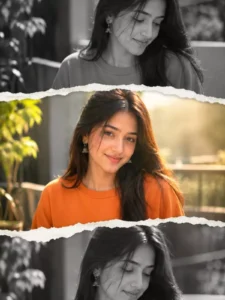
Create a stylish collage portrait using the uploaded photo.

Split the image into 3 horizontal torn-paper sections stacked vertically.

The middle section should be in full color, showing a smiling pose with natural sunlight on the face.

The top and bottom sections should be in black & white, with slightly different angles or expressions from the same photo.

Add a realistic torn paper effect between the sections.

Keep the background soft and slightly blurred outdoor balcony/greenery vibe).

Enhance lighting to give a warm, glowing, aesthetic Instagram look.

Maintain natural skin tone and sharp facial details.

Add subtle shadows and depth for a premium edit feel.

Style: modern aesthetic, soft, feminine, Instagram reel/post style, high quality, DSLR look
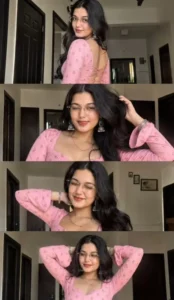
Create an ultra-realistic 9:16 vertical 4-frame collage using the uploaded face as the exact identity reference. Keep the exact face, skin tone, features, body proportions, and thin transparent glasses consistent in all frames; remove any flower. Background: cozy modern Indian home with soft daylight, cream walls, dark wooden doors, tiled floor, and ceiling fan. Outfit: soft pastel pink fitted short kurti (sweetheart neckline, bell sleeves, corset back, side slits) with the same tiny mustard-gold and rust floral buta prints as the reference, paired with dark navy leggings/jeans. Add silver jhumkas, bangles, thin chain, and a tiny black bindi. Long wavy middle-parted hair and minimal soft-glam makeup. Frames: 1) over-shoulder soft smile, 2) wink + tongue out touching hair, 3) scrunched-eye smile with hand behind neck, 4) both hands behind head with a natural smile. Style: ultra-realistic DSLR + smartphone selfie, cinematic indoor lighting, cozy Pinterest aesthetic, highly detailed textures, and consistent identity in all four photos.
How To Create Image Using Chatgpt?
Let’s discuss how to create this photo edit using a simple method that delivers perfect results. The process is very straightforward. First, copy any of the image prompts provided in this article. Next, open the ChatGPT app—you can install it from the Play Store or access it via the official website. Then, paste the copied prompt and add a reference image; click the plus (+) icon to upload a clear photo of your face so that the generated image matches your features. Once you’ve added a clear photo, click the ‘Generate’ button, wait a few moments, and your AI-generated photo will be ready. That’s how easily you can create it.
Conclusion
So friends, I hope you enjoyed this tutorial on viral photo editing and learned how to easily create this trending style of image. You no longer need to put in the hard work required previously; with the help of a simple prompt, you can easily generate such photos. If you want to create more unique and trending images, feel free to visit our website. You will find various types of prompts there that allow you to use AI to create your own images—and the process is incredibly simple. I have explained the steps, so I hope you liked this article. Please do share it!